Design Leadership Case Study

Transforming Conversational Intelligence
with AI Agents

As Product Design Manager and Design & Research Lead, I spearheaded an 4-month initiative to redesign our conversational AI platform, consolidating three disconnected products — Agent Assist (voice), Chat/WhatsApp support, and Email self-service — into a unified, LLM-powered agent experience.

Role
Product Design Manager & Research Lead
Duration
4 months
Team
4 designers (2 Product, 1 Design System, 1 Manager)
Scope
Agent Assist + Unified Agent Studio
46%
Reduction in average
call handling time
38%
Improvement in agent
satisfaction scores
68%
Increase in self-service
call resolution
100%
Alert visibility through
redesigned patterns
Part 1: Agent Assist Redesign

The Challenge

Our contact center solution suffered from critical fragmentation. Three separate products — each with distinct configuration systems — created operational inefficiencies and poor user experiences.

Product Ecosystem Issues

Agent Assist Used intent-based NLP detection
Chat Support Relied on keyword-based systems
Email Self-Service Operated independently
Cross-Product No communication or data sharing between products
Configuration Inconsistent design-time configuration across platforms
Runtime Limited capabilities (only Agent Assist and Chat had active assistance)

Critical UX Problems Identified

1
Cognitive Overload
Agents managed a 70-30 split-screen interface (70% client CRM, 30% our tool) while simultaneously navigating legacy, non-responsive systems.
2
Hidden Alerts
Critical notifications were buried in tabs, causing agents to miss time-sensitive information.
3
Context Switching
Constant toggling between applications, tabs, and systems disrupted call flow.
4
Fragmented Workflows
Each product operated in isolation, forcing agents to learn and manage multiple systems.
Legacy Agent Assist runtime interface showing fragmented panels and disconnected workflows
The legacy runtime experience — fragmented agent-facing panels with disconnected workflows, buried alerts, and limited contextual guidance.

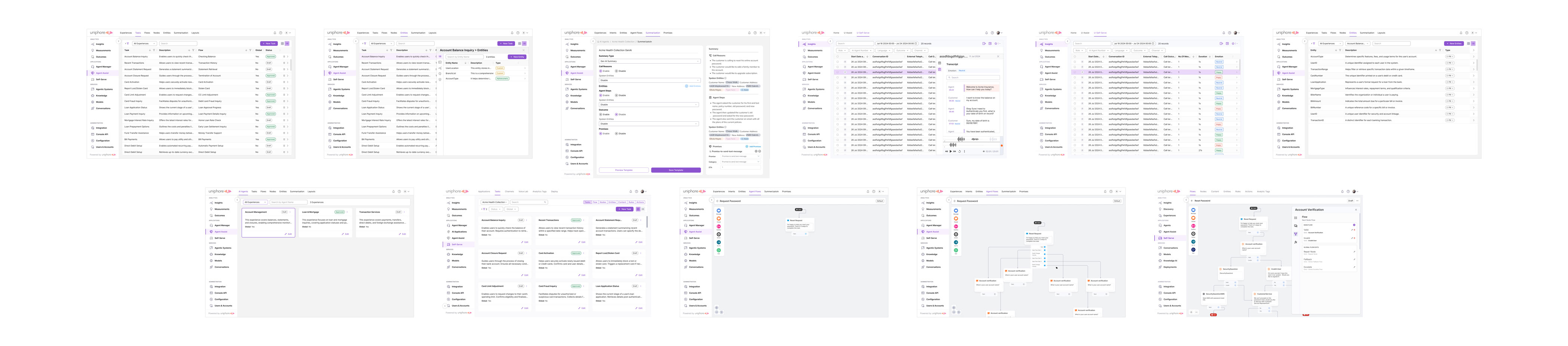
Legacy design-time configuration interfaces across three separate products showing fragmented and inconsistent UI patterns
The existing design-time configuration interfaces across three separate products — each with distinct configuration paradigms, inconsistent navigation, and siloed settings.
Discovery & Research Methodology

Building a Complete Picture

As Design & Research Lead, I architected a comprehensive discovery phase combining multiple research methodologies to build a complete picture of user needs and market opportunities.

1. Feature Consolidation
Auditing Three Products
Working closely with Product Management, I facilitated workshops to audit and consolidate capabilities across all three products, identifying overlaps, gaps, and opportunities for integration.
2. UX Audit
Heuristic Evaluation
I conducted a heuristic evaluation of all existing products, documenting interface inconsistencies, interaction pattern conflicts, information architecture problems, accessibility gaps, and visual design inconsistencies.
3. Field Research
Multi-Site Journey Mapping
I led on-site research across multiple contact centers, varying in size and industry vertical. This immersive research revealed real-world workflows, pain points, and workarounds that quantitative data couldn’t capture.

Field Research Approach

Methods Contextual inquiries with call center agents, shadowing during live calls
Mapping End-to-end journeys for different call types, environmental factors
Key Insights Agents processed information non-linearly. Legacy CRM forced rigid workflows. Alert fatigue from poorly timed notifications. High cognitive load from managing multiple mental models.
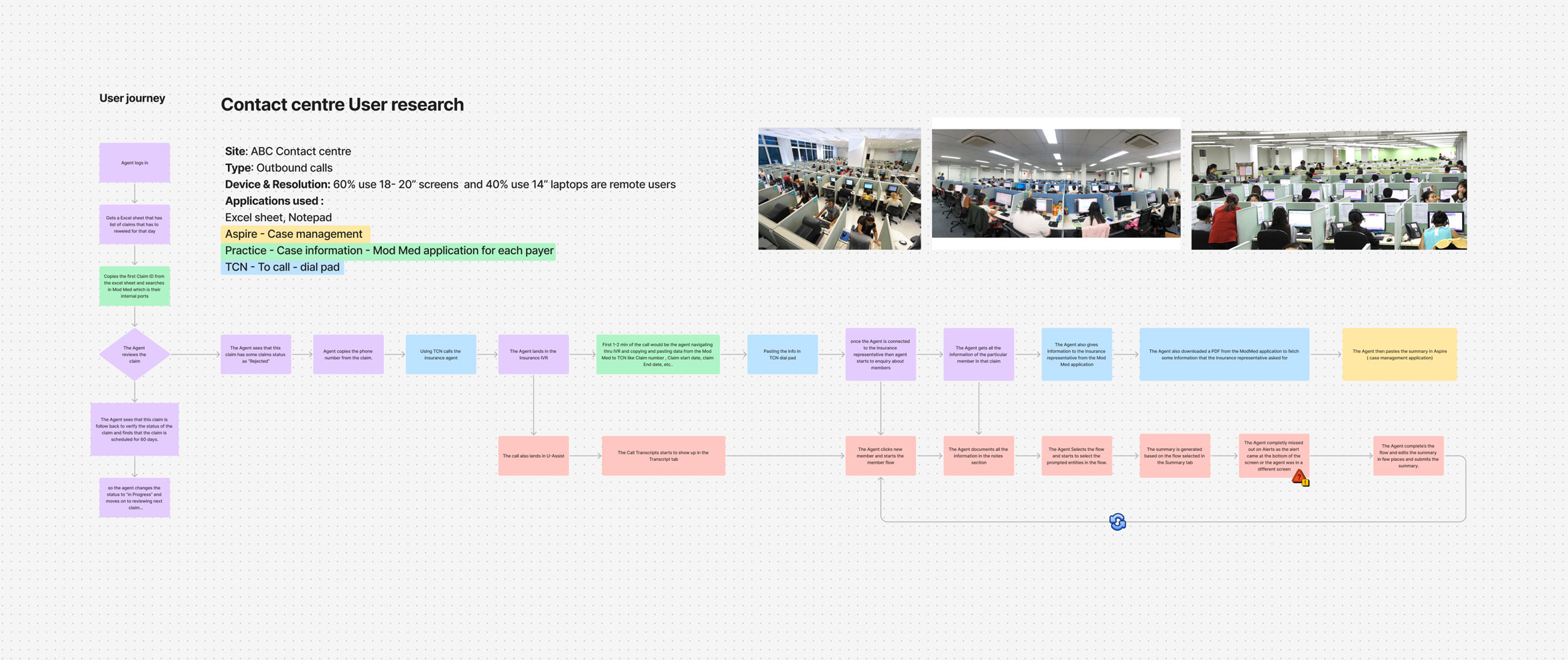
On-site contact center field research — user journey mapping, agent workflow documentation, and environment photography
On-site field research at contact centers — documenting agent workflows, environment constraints, device usage (60% desktop 18-20″, 40% laptop 14″), and mapping end-to-end user journeys across applications like Aspire, Mod Med, and TCN.
4. Competitive Analysis

I analyzed 10-15 competitors to understand market positioning and identify feature gaps.

Key Insights:

  • Industry trend toward unified workspaces over split-screen interfaces
  • Proactive assistance gaining adoption over reactive lookup tools
  • Real-time transcription and sentiment analysis becoming table stakes
  • Multi-modal support (voice, chat, email) expected in single interface
5. Strella AI User Research

Leveraged Strella AI for advanced user research and feedback analysis with quantitative rigor.

Methodology:

  • Prototype testing with real contact center agents
  • Task-based usability studies
  • Sentiment analysis of user feedback
  • Behavioral pattern identification
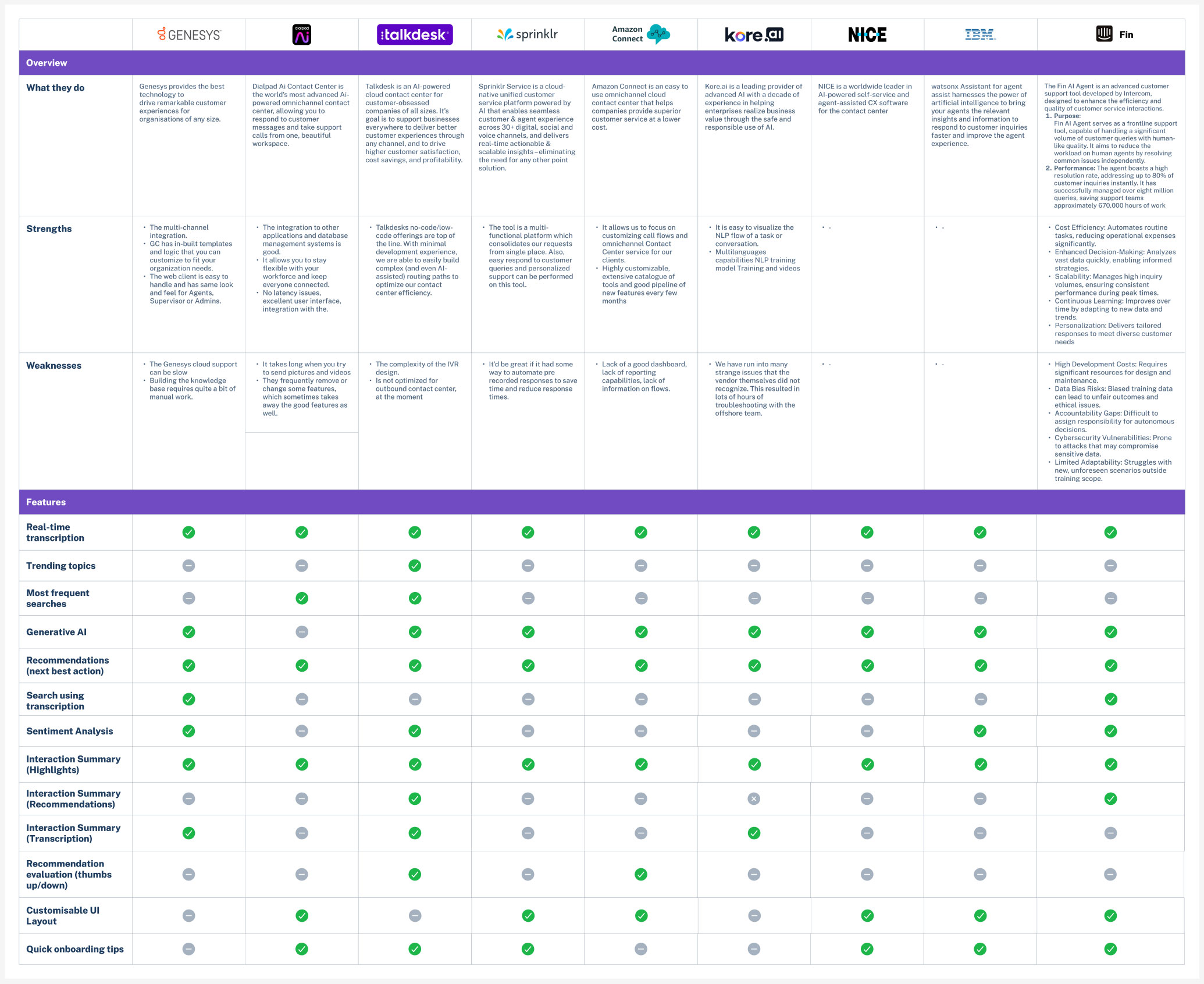
Comprehensive competitive feature comparison across Genesys, Dialpad, Talkdesk, Sprinklr, Amazon Connect, Kore.ai, NICE, IBM Watson, and Intercom Fin
Comprehensive competitive analysis across 10+ contact center platforms — evaluating real-time transcription, generative AI, recommendations, sentiment analysis, and customisable UI capabilities.
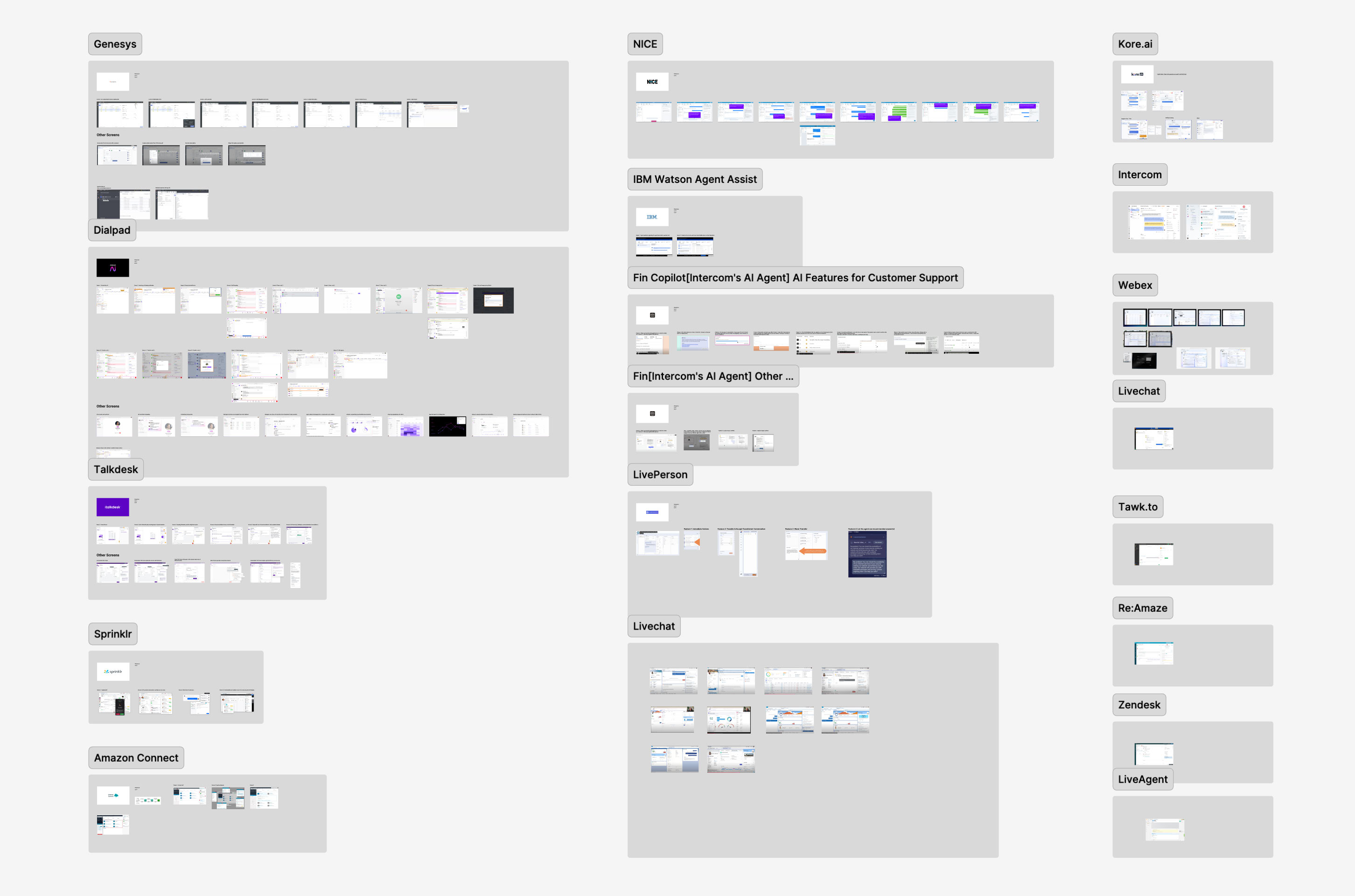
Competitor interface audit showing UI patterns across Genesys, NICE, IBM Watson, Intercom Fin, Kore.ai, Talkdesk, Sprinklr, Amazon Connect, and other contact center platforms
Competitor interface audit — analyzing UI patterns, information architecture, and agent workflows across Genesys, NICE, IBM Watson, Intercom Fin, Talkdesk, Sprinklr, and other leading platforms.

Critical Findings from Strella AI Research

Real-time Data Sync Agents required conversation RAG (Retrieval-Augmented Generation) updates at call completion, not the current 4-hour delay. This directly impacted our technical architecture decisions.
Resolution Tracking Surfacing resolution status and related case numbers as prominent entities proved essential for agent efficiency.
Info Architecture Historic conversations needed restructuring with a mini-timeline view for better readability and accessibility, rather than dense text blocks.
Caller Profile This label didn’t resonate with users. Agents needed journey-specific context or caller communication preferences (e.g., “speaks slowly, requires repetition”) rather than generic profile data.
Contextual Integration Opening scripts felt disconnected. Agents wanted integrated, contextual information rather than separate information blocks requiring cognitive assembly.
Visual Hierarchy Color usage in high-stress contact center environments demanded exceptional care — it drove attention more powerfully than in typical applications.
Interaction Efficiency Expanding/collapsing call history needed smoother, more accessible controls for rapid information access during live calls.
Entity Recognition Opportunity to use LLM capability to extract case IDs generated during calls and use them as journey identifiers, reducing manual data entry.
Design Exploration & Iteration

Redesigning Agent Assist

With research insights in hand, I led my team through an intensive ideation and prototyping phase, emphasizing quantity over initial quality to explore the full solution space.

Exploration Philosophy

Rather than converging prematurely on a single approach, we deliberately explored multiple directions:

  • Rapid low-fidelity prototyping sessions
  • Parallel exploration of competing concepts
  • Cross-team critique and feedback loops
  • User validation at key decision points
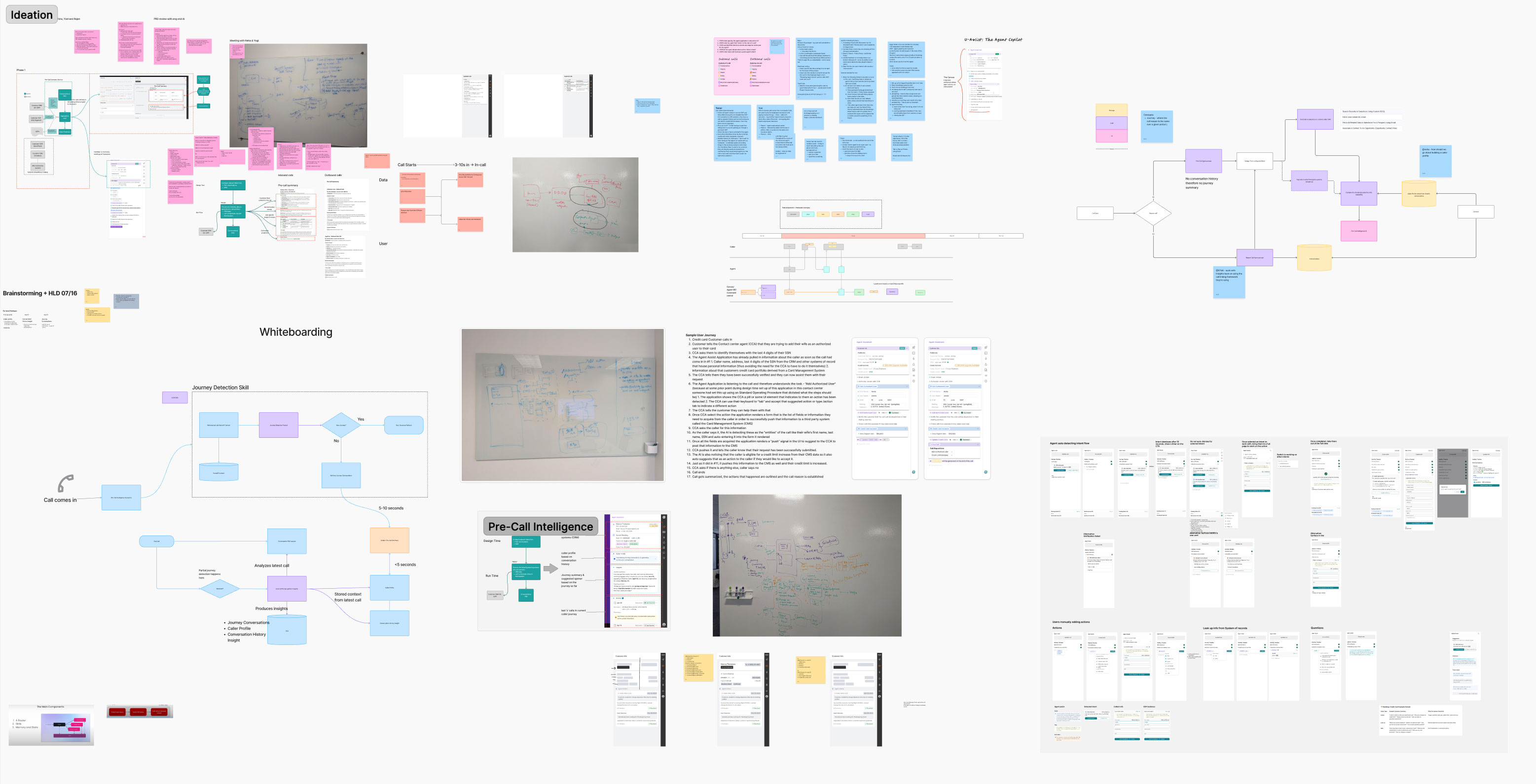
Ideation artifacts including brainstorming sessions, whiteboarding, journey detection skill mapping, pre-call intelligence exploration, and system architecture diagrams
Ideation artifacts — from brainstorming sessions and whiteboarding to journey detection skill mapping, pre-call intelligence exploration, and system architecture diagrams.

Key Design Pivots

1. Abandoning the 70-30 Split. Research revealed agents actually preferred full-screen tab switching over split views. The 70-30 ratio prevented focus during calls and didn’t accommodate non-responsive legacy systems. We redesigned around tab-based navigation with intelligent context preservation.

2. Alert Visibility Redesign. Instead of hiding alerts in tabs, we introduced a persistent alert panel with visual hierarchy, context-aware alert prioritization, mandatory acknowledgment patterns for critical notifications, and smart alert dismiss interaction that required agent confirmation. This resulted in 100% alert visibility and zero missed critical notifications post-launch.

3. Contextual Information Architecture. Rather than forcing agents to hunt for information across tabs, we surfaced relevant information based on call context, introduced collapsible sections with intelligent defaults, designed a mini-timeline for customer journey visualization, and integrated opening context directly into the main call interface.

Final Design Solution

The redesigned Agent Assist interface transformed the agent experience through strategic information architecture, intelligent assistance, and seamless workflow integration.

1. Unified Call Interface
Single-pane focus during active calls with context-aware information surfacing, integrated customer journey timeline, and real-time conversation RAG updates.
2. Intelligent Alert System
Persistent, non-intrusive alert panel with color-coded priority system informed by Strella AI research on color psychology in high-stress environments. Mandatory acknowledgment for critical alerts with contextual alert grouping.
3. Customer Context Panel
Journey-specific insights replacing generic “Caller Profile,” historical interaction timeline with expand/collapse functionality, related case surfacing with resolution status, and communication preference indicators.
4. Task Guidance Integration
Real-time suggestions based on conversation analysis, relevant answer system powered by KaaS (Knowledge as a Service), proactive next-step recommendations, and resolution pathway suggestions.
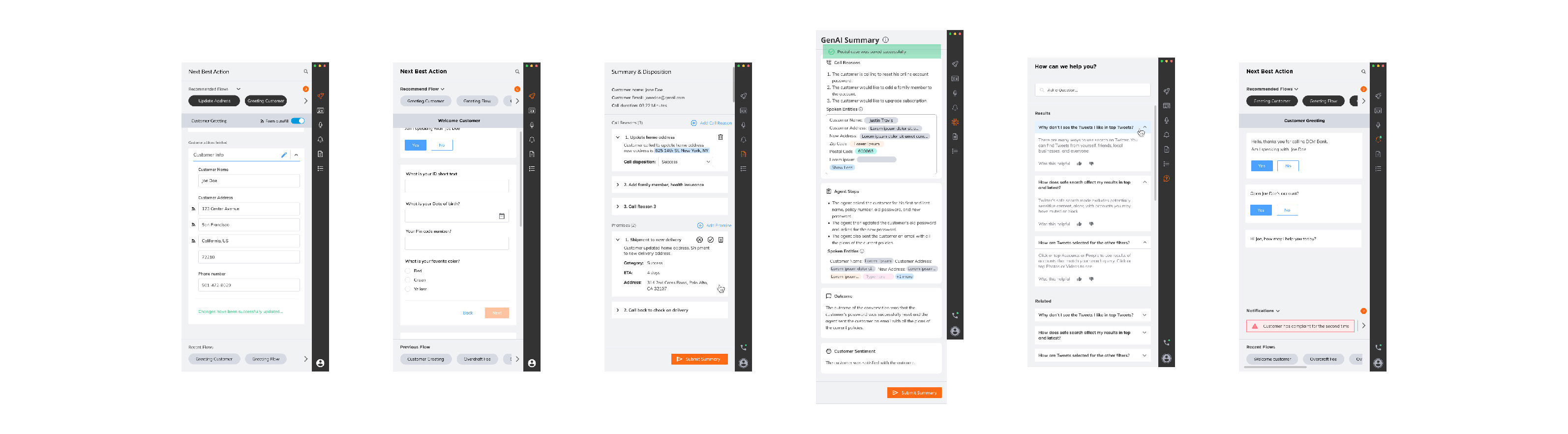
Final Agent Assist UI design showing unified call interface with customer context, real-time transcription, alerts, agent steps, and summary panels
Final Agent Assist UI — unified call interface with customer context, real-time transcription, intelligent alerts, guided agent steps, and comprehensive summary panels.

Impact & Outcomes

Qualitative Improvements

  • Reduced cognitive load through streamlined information architecture
  • Increased agent confidence with proactive guidance
  • Improved first-call resolution through better context availability
  • Enhanced training efficiency for new agents

Business Impact

  • Reduced operational costs through improved efficiency
  • Increased customer satisfaction from faster resolution times
  • Decreased agent turnover from improved work experience
  • Competitive differentiation in enterprise sales
Part 2: Unified Agent Studio

From NLP to Multi-Agent LLM Architecture

While redesigning the agent-facing experience, we recognized a fundamental opportunity to transform our backend architecture. The emergence of Large Language Models presented a chance to eliminate the complexity of managing separate intent-based and keyword-based systems. This wasn’t just a technical migration — it was a fundamental rethinking of how we build, configure, and deploy conversational AI solutions.

The Architectural Challenge
01
Manual intent configuration and training
02
Separate keyword libraries for different channels
03
Complex cross-product orchestration logic
04
Limited adaptability to new use cases
Deployment: Weeks
The Agentic Solution
01
Single LLM-powered orchestration layer replacing multiple detection systems
02
Multi-agent architecture for specialized task handling
03
Dynamic intent detection without manual configuration
04
Unified knowledge base across all channels
Deployment: Days

Design Challenge: Unified Configuration Experience

Creating the Unified Agent Studio meant solving a complex design problem: how do we give non-technical users the power to create, configure, and orchestrate multiple AI agents without requiring engineering expertise?

Key Design Requirements

01 Single configuration interface for all channels (voice, chat, email, WhatsApp)
02 Visual flow builder for agent orchestration
03 Knowledge base integration and management
04 Multi-agent coordination and handoff design
05 Testing and simulation capabilities
06 Version control and deployment management

Research: Flow Builder Competitive Analysis

As Design Lead, I conducted extensive research into flow builder interfaces across the market. We analyzed 10-15+ competitors to understand successful patterns and identify opportunities for innovation.

Competitors Analyzed

Enterprise Automation Salesforce Flow, Microsoft Power Automate
Conversational AI Dialogflow, Amazon Lex, Rasa
No-code / Low-code Zapier, Make, n8n
Workflow Orchestration Airflow, Prefect

Key Research Insights: Node-based interfaces provided the best balance of power and usability. Contextual property panels reduced cognitive load. Inline validation prevented downstream errors. Visual feedback during flow execution aided debugging. Template libraries accelerated common use cases.

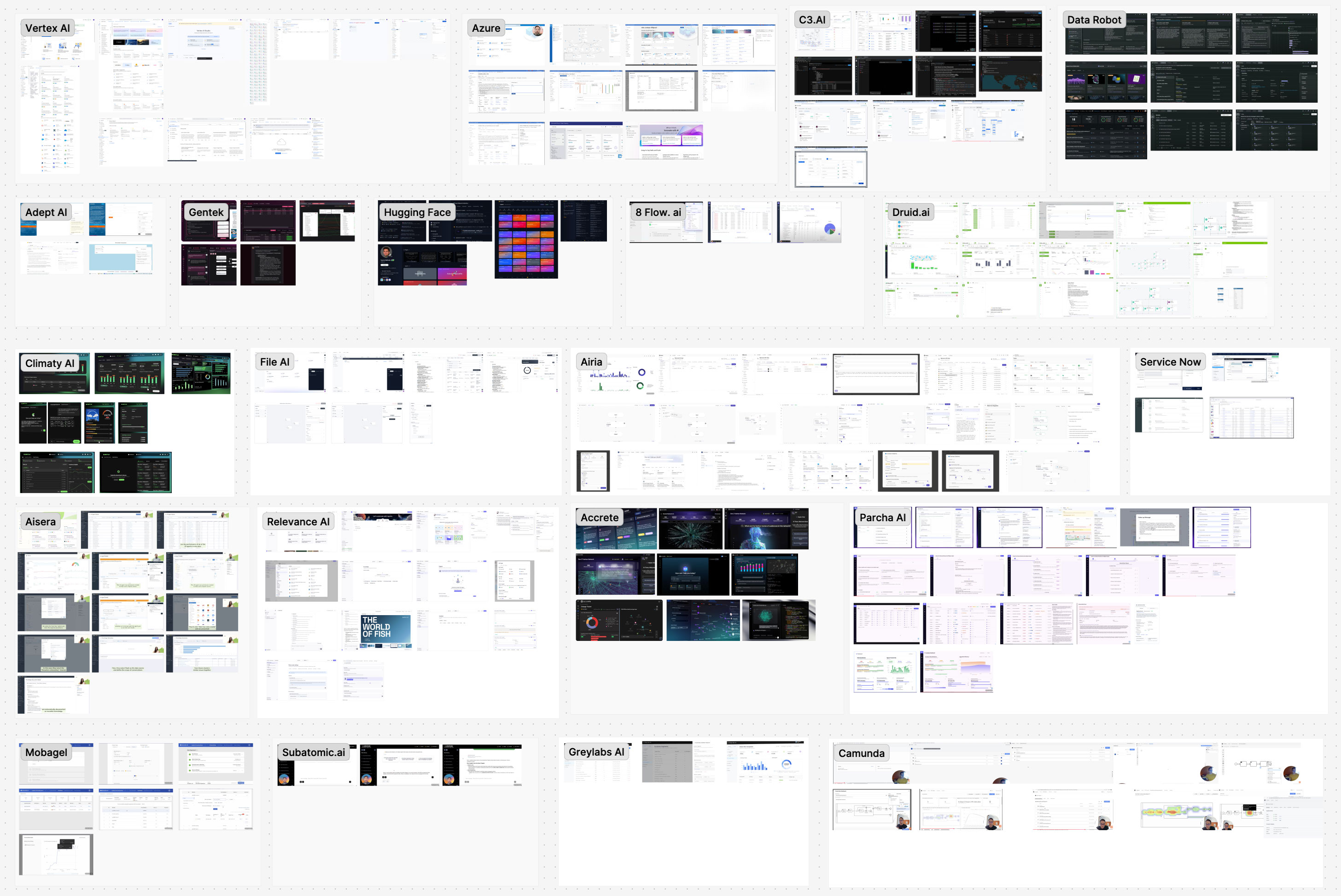
Extended competitive research across AI and ML platforms including Vertex AI, Azure, C3.AI, Data Robot, Adept AI, ServiceNow, and others
Extended research across AI and ML platforms — studying configuration patterns, data visualization, and workflow builders across Vertex AI, Azure, C3.AI, ServiceNow, Aisera, and others.

Design Exploration: Flow Builder Iterations

Understanding that the flow builder would be the heart of the Unified Agent Studio, I led multiple rounds of exploration to find the optimal balance between simplicity and power.

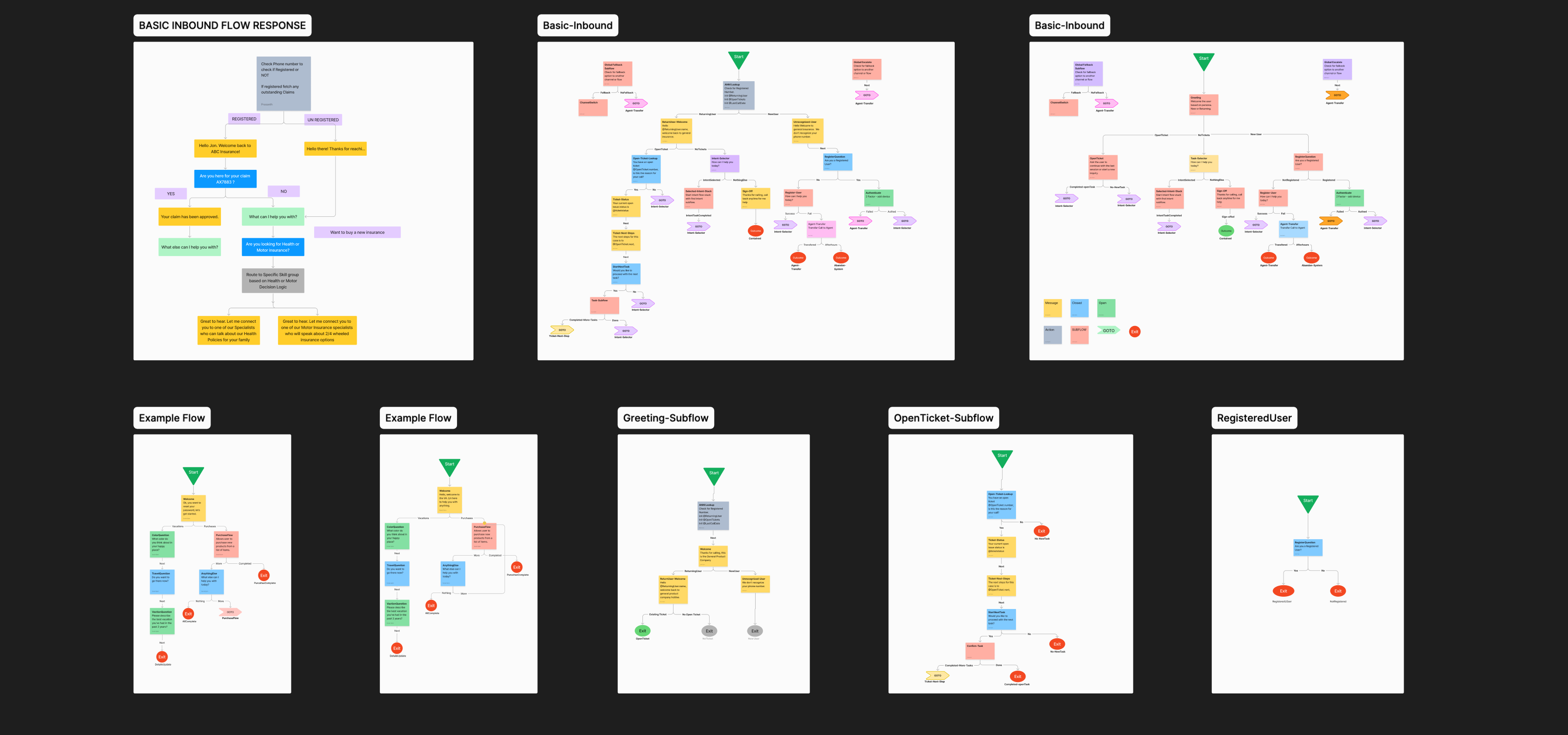
Flow builder iteration artifacts showing conversation flow diagrams, inbound routing, and subflow logic explorations
Flow builder iterations — exploring inbound routing patterns, greeting subflows, ticket-handling logic, and conversational flow structures across multiple design rounds.

Approaches Explored

Linear Timeline Good for simple flows, broke down with complexity
Swimlane Model Excellent for showing parallel processes, but steep learning curve
Node-based Graph Best balance of flexibility and comprehension
Decision Tree Clear logic flow, limited for non-linear conversations
State Machine Powerful but too technical for target users

We ultimately converged on a hybrid node-based approach that combined the intuitiveness of visual flows with the power of state management.

Final Solution: Core Capabilities

The Unified Agent Studio provides a comprehensive design-time environment for creating, configuring, and managing AI agents across all channels.

01
Visual Flow Builder
Proprietary node-based interface for designing conversational flows, configuring multi-agent orchestration and handoffs, defining conditional logic, integrating with external APIs, and testing flows in real-time with simulation mode.
02
Knowledge as a Service (KaaS)
The intelligence layer powering our agents — vector database creation from client knowledge bases, real-time retrieval for answer generation, dynamic knowledge updates without flow reconfiguration, and multi-source knowledge synthesis.
03
Task Guide Configuration
Informed by Strella AI research, provides agents with intelligent, context-aware assistance — defining task sequences, configuring trigger conditions, customizing suggestion templates, and real-time coaching interventions.
04
Unified Configuration Dashboard
A single interface for managing all channels (voice, chat, email, WhatsApp), agent creation, knowledge base connections, deployment versioning, and analytics and performance monitoring.
The redesigned Unified Agent Manager interface for creating and managing AI agents across all channels
The redesigned Agent Manager — a unified interface for creating, configuring, and orchestrating AI agents across voice, chat, email, and WhatsApp channels.

Flow Builder Key Differentiators

Context Preservation Visual indicators show data flow between nodes
Agent Specialization Clear distinction between single-agent and multi-agent nodes
Inline Validation Real-time error detection and suggestions
Collaborative Editing Multi-user support with conflict resolution

Technical Innovation: LLM-Powered Intent Detection

The shift from manual intent configuration to LLM-powered detection represented a fundamental change in how our system understands and responds to user needs.

Legacy Approach
Manual intent creation and labeling
Training data collection and annotation
Model training and tuning
Ongoing maintenance and updates
Limited adaptability to edge cases
LLM-Powered Approach
Automatic intent understanding from conversation
Zero-shot learning for new scenarios
Natural language orchestration logic
Self-improving through interaction
Seamless handling of ambiguity

Design Implications: This architectural shift allowed us to simplify configuration interfaces, reduce time-to-deployment from weeks to days, enable non-technical users to create sophisticated agents, support more natural and flexible conversations, and eliminate manual intent maintenance.

Design System Integration

As our team included a dedicated design system designer, we ensured consistency and scalability across the entire Unified Agent Studio.

  • Standardized component library for flow builder nodes
  • Consistent interaction patterns across configuration interfaces
  • Accessible color system (critical given Strella AI findings on color usage)
  • Responsive layouts for different screen sizes
  • Documentation for engineering handoff

This systematic approach accelerated development velocity and ensured quality across the expanding product surface area.

Leadership & Team Collaboration

Design Leadership in Practice

Team Structure & Allocation

As Product Design Manager, I structured a lean, high-performing team of 4:

2 Product Designers Focused on Agent Assist interface and Unified Agent Studio flows
1 Design System Designer Maintained consistency and built reusable components
Myself (Design Manager) UX Research, Design Strategy, Stakeholder Management, and hands-on design leadership
Research-Driven Decision Making
  • Established a culture of evidence-based design across the team
  • Leveraged multiple research methodologies to validate decisions and reduce risk
  • Created conviction to make bold decisions and defend them to stakeholders
Cross-Functional Collaboration
  • Partnered closely with Product Management on feature prioritization and roadmap
  • Worked with Engineering to ensure technical feasibility of LLM-powered features
  • Collaborated with Sales and Customer Success to understand market requirements
  • Engaged with end users throughout the design process
Team Development
  • Mentored designers in enterprise UX patterns and complex system design
  • Facilitated design critiques and knowledge sharing sessions
  • Encouraged exploration and experimentation during ideation phases
  • Created clear decision-making frameworks to move from exploration to execution
Stakeholder Management
  • Presented design direction to executive leadership
  • Aligned multiple business units around unified vision
  • Managed expectations during architectural transition to LLM
  • Communicated design rationale with compelling storytelling
What’s Next

The Game Plan

Building on the success of the Agent Assist redesign and Unified Agent Studio launch, we’ve mapped a clear path forward for continued innovation and value delivery.

Phase 1: Pre-call Intelligence

Objective: Empower agents with comprehensive context before calls begin

Key Initiatives:

  • Customer journey analysis and synthesis
  • Predictive issue identification
  • Recommended opening strategies
  • Proactive knowledge surfacing

Design Focus:

  • Information architecture for pre-call briefing
  • Integration with calendar and call routing systems
  • Personalization based on agent expertise
  • Mobile-optimized pre-call views for remote agents
Phase 2: Enhanced Task Guide with New UI

Objective: Evolve Task Guide from reactive suggestions to proactive coaching

Key Initiatives:

  • Real-time sentiment analysis and intervention
  • Adaptive guidance based on agent performance
  • Personalized coaching recommendations
  • Integration with quality assurance workflows

Design Focus:

  • Non-intrusive coaching delivery during active calls
  • Progressive disclosure of complex guidance
  • Agent preference and learning style adaptation
  • Supervisor visibility and override capabilities

Strategic Priorities

Timeline Initiatives
Near-term (6 months) Iterate on Unified Agent Studio based on early adopter feedback. Expand KaaS capabilities with multi-modal knowledge sources. Enhance flow builder with advanced debugging tools. Build template library for common use cases.
Long-term (12-18 months) AI-powered flow optimization suggestions. Autonomous agent creation from business requirements. Multi-language and localization support. Advanced analytics and insight generation.
Reflection & Key Learnings

Key Learnings

This 4-month journey from fragmented products to unified, AI-powered experience taught valuable lessons about design leadership in enterprise AI:

1. Research Depth Creates Design Confidence
Investing in comprehensive research — field studies, competitive analysis, and Strella AI validation — gave us conviction to make bold decisions and defend them to stakeholders.
2. Architectural Shifts Require Design Thinking
The transition to LLM-powered multi-agent systems wasn’t just technical — it fundamentally changed how users would interact with the system. Design thinking was essential to translate architectural capability into user value.
3. Simplification Is the Hardest Design Challenge
Consolidating three complex products into one coherent experience required ruthless prioritization and willingness to eliminate features that didn’t serve the core user workflow.
4. Measure What Matters
Defining clear success metrics (46% AHT reduction, 38% satisfaction improvement) created alignment and made the business impact undeniable.
5. Team Structure Drives Success
A small, senior team with clear ownership areas moved faster than a large team with distributed responsibility. The dedicated design system resource paid dividends in consistency and velocity.

Conclusion

The Unified Agent Studio project demonstrates how strategic design leadership can transform enterprise AI products. By combining deep user research, systematic competitive analysis, and bold architectural vision, we created a platform that not only solved immediate user pain points but positioned the company for the future of agentic AI.

The measurable impact — 46% reduction in handling time, 38% improvement in satisfaction, 68% increase in self-service resolution — validates the power of human-centered design in complex enterprise systems. More importantly, we created a foundation for continuous innovation that will serve customers and agents for years to come.

This case study represents not just a successful product redesign, but a model for how design leadership can drive business transformation in the age of AI.

Duration 4 months
Role Product Design Manager, Design & Research Lead
Team 4 designers (2 Product Designers, 1 Design System Designer, 1 Design Manager)
Methodologies Field research, competitive analysis, user journey mapping, Strella AI validation, iterative prototyping
Technologies LLM-powered multi-agent architecture, KaaS vector databases, real-time conversation RAG