UX Case Study

Unifying Multiple Products
Into One Platform

Customers didn’t experience a platform. They experienced disconnected tools.

Role
UX Design & Research Manager
Duration
6+ months
Scope
Enterprise SaaS
Method
Research · IA · Strategy
12→1
Products unified
into one platform
47
Overlapping features
rationalized
4
Intent-driven
pillars
12
Product stakeholders
aligned
Overview

The Background

Over the past decade, the company had grown through a combination of organic product development and strategic acquisitions. What started as a single conversational AI solution had evolved into a comprehensive enterprise suite: acquired products including CoreLayer, ConvoCapture, AgentAssist, CampaignHub, and AudienceIQ, alongside in-house built tools like DataStream, ModelForge, AnalyticsHub, InsightExplorer, BotStudio, ComplianceDesk, and SalesIQ.

However, this growth came at a cost. Each product was built by different teams, at different times, with different technology stacks and design philosophies. Acquired products maintained their original branding and user experience. The result was a fragmented ecosystem where customers had to navigate between completely separate applications to accomplish their goals.

I recognized this as both a significant business problem and a design opportunity. If we could unify these 12 products into a cohesive platform, we could dramatically improve customer experience, reduce support costs, increase cross-sell opportunities, and position the company as a true platform leader.

!
The Context
Customers struggled with context switching and multiple credentials. Each product had different navigation patterns, terminology, and mental models. Enterprise customers were impacted by separate user provisioning, documentation for 12 interfaces, and 12 different APIs. Competitors were consolidating into unified platforms.
My Role & Responsibilities
Research & Discovery: stakeholder interviews, user research, competitive analysis. Information Architecture: unified navigation structure, taxonomy, content organization. Stakeholder Alignment: building consensus across product teams. Executive Communication: pitch deck and documentation for leadership buy-in.

Hypothesis: If we could reorganize our products around user intent rather than product boundaries, we could create a unified experience that felt intuitive regardless of which features a customer used. Users don’t think in terms of ‘products’—they think in terms of tasks they want to accomplish.

Product Landscape

The 12 Products

ConvoCapture
Conversation Capture
Recording and capturing voice and chat conversations across channels. Acquired
AnalyticsHub
Analytics
Dashboards, reports, and performance metrics across the contact center. Built in-house
InsightExplorer
Insight Exploration
Self-serve discovery of trends and signals from conversation data. Built in-house
AgentAssist
Agent Assistance Suite
Real-time guidance and next-best-action tools for contact center agents. Acquired
BotStudio
Virtual Assistant Builder
Building and deploying AI-powered self-service virtual assistants. Built in-house
ComplianceDesk
Compliance Suite
Monitoring, flagging, and reporting for regulatory compliance. Built in-house
DataStream
Data Ingestion & RAG
Real-time data ingestion pipelines and retrieval-augmented generation infrastructure. Built in-house
ModelForge
AI Model & Agent Builder
Custom AI model development, agent orchestration, and deployment. Built in-house
CoreLayer
Backend Configuration Layer
Shared configuration and integration backbone for AgentAssist and BotStudio. Acquired
CampaignHub
Marketing Suite
Campaign management, messaging, and marketing automation tools. Acquired
AudienceIQ
CDP & Audience Intelligence
Customer data platform for audience segmentation and real-time activation. Acquired
SalesIQ
Sales Intelligence
Pipeline insights, conversation coaching, and deal intelligence for sales teams. Built in-house
Challenge

Understanding the Fragmentation

Before proposing any solutions, I needed to fully understand the scope and impact of the fragmentation. I spent three weeks conducting discovery research, which included analyzing support tickets, interviewing customers, shadowing users, and auditing each product’s information architecture.

What I discovered was worse than expected. The fragmentation wasn’t just a UX inconvenience—it was actively preventing customers from getting value from our products. Many customers were only using 2–3 of our 12 products, not because they didn’t need the others, but because the effort required to learn and manage additional systems was too high.

Support ticket analysis revealed that 23% of all tickets were related to navigation confusion, permission issues across products, or questions about how features in different products related to each other.

4 Separate Logins
Fragmented Access
Users juggled 4 different sets of credentials across the product suite. Password resets accounted for 8% of all support tickets.
5 Different Experiences
Inconsistent Design
Products looked and behaved differently. Users had to re-learn navigation patterns and terminology each time they switched tools.
40+ Duplicate Terms
Terminology Chaos
Same features named differently across products. “Dashboards” vs “Reports” vs “Analytics” meant different things.
What User Research Revealed
“I feel like I’m using products from 5 different companies.” — Contact Center Manager

“My team refuses to use [Product X] because it looks completely different.” — Operations Director

“I’ve given up trying to explain how all these tools fit together to new hires.” — Training Manager
$
The Business Impact
Lower product adoption: 3+ product users had 40% higher retention, but only 31% reached this threshold.

Higher support costs: Navigation/access issues consumed 23% of support resources.

Longer onboarding: 6 weeks time-to-value, 2 weeks spent just learning multiple interfaces.
Before: Fragmented Product Landscape
ucapture.app
ConvoCapture
uanalyze.app
AnalyticsHub
udiscover.app
InsightExplorer
uassist.app
AgentAssist
uselfserve.app
BotStudio
ucomply.app
ComplianceDesk
xstream.app
DataStream
xforge.app
ModelForge
xplatform.app
CoreLayer
jinfoworks.app
CampaignHub
jactioniq.app
AudienceIQ
qforsales.app
SalesIQ
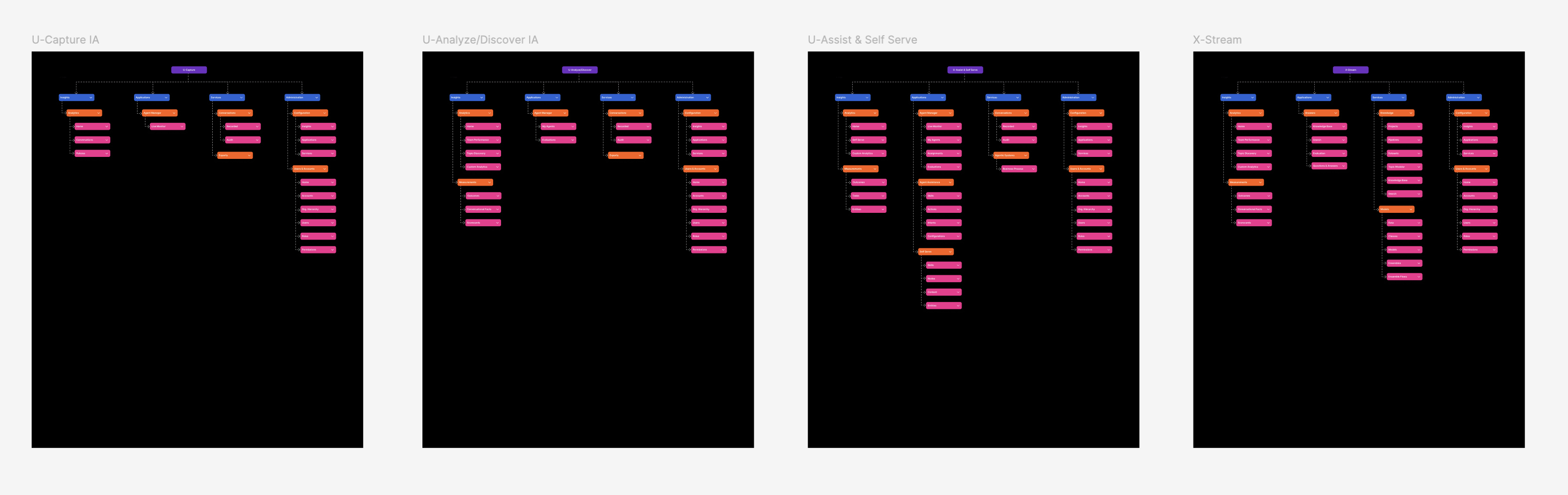
Individual product information architectures showing each product had its own independent structure
Each acquired and in-house product had evolved its own independent information architecture — with no shared patterns, terminology, or navigation conventions.
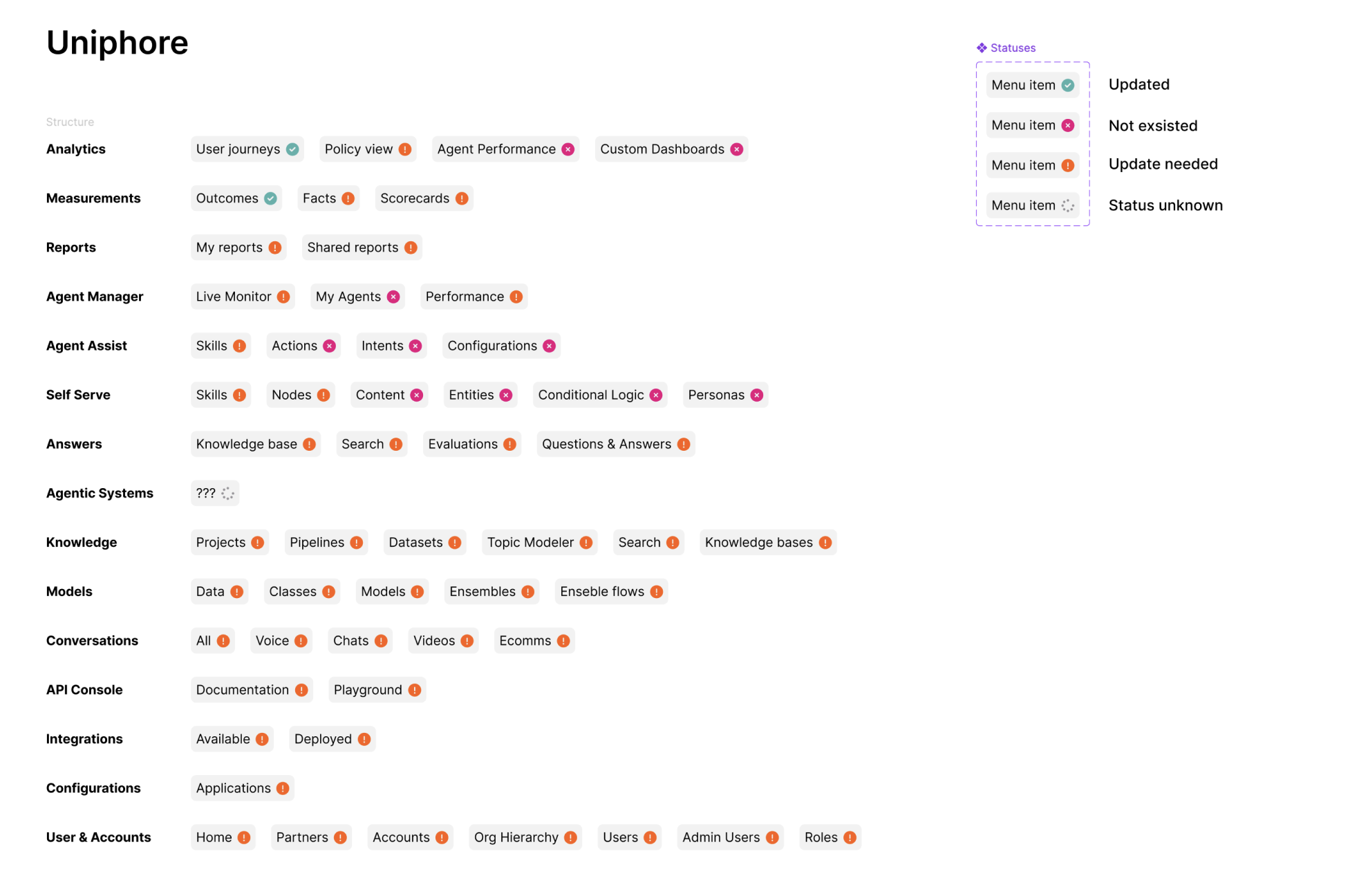
Feature-level audit across all products showing migration status
A feature-level content inventory across all products — tracking every menu item, its status, and migration readiness.
Process

Research & Discovery

Given the complexity of unifying twelve products built over a decade—a mix of acquisitions and internal builds—I knew this project required a rigorous research foundation. I structured my research in three phases: Discovery (understanding the current state), Exploration (identifying possible solutions), and Validation (testing proposed structures).

The entire research phase took approximately 4 months, involving 35+ stakeholder interviews, 18 customer interviews, competitive analysis of 12 platforms, and validation testing with 24 users.

Step 01

Stakeholder Interviews & Internal Discovery

I began by mapping the internal landscape. I conducted 35 interviews with product managers, engineers, customer success managers, and sales teams across all twelve products—from acquired suites like AgentAssist, ConvoCapture, CampaignHub, and AudienceIQ to in-house tools like ModelForge, DataStream, AnalyticsHub, and SalesIQ.

Key Discovery: I created a comprehensive feature matrix that revealed 47 instances of duplicate or overlapping functionality across products. Multiple products had their own ‘dashboard builder,’ AnalyticsHub, InsightExplorer, and AudienceIQ had separate reporting modules, and analytics capabilities were scattered across AnalyticsHub, ConvoCapture, and AgentAssist with no shared terminology.

35 stakeholder interviews · 47 feature overlaps identified · Complete feature matrix created

Step 02

Competitive Analysis & Industry Benchmarking

I conducted deep-dive analysis of 12 enterprise platforms: Salesforce, HubSpot, ServiceNow, Zendesk, Adobe Experience Cloud, Microsoft Dynamics, SAP, Oracle, Workday, Atlassian, Pega, and Genesys.

Key Patterns: The most successful platforms organized navigation around user intent (what you want to do) rather than product boundaries (which tool you’re using). They used consistent patterns: primary navigation for functional areas, secondary navigation for modules, consistent settings placement.

12 platforms analyzed · 8 IA patterns documented · Best practices synthesized

Step 03

Card Sorting & Mental Model Research

I ran both open and closed card sorting exercises with 24 participants.

Open Card Sort: Participants grouped 87 feature cards into categories. This revealed users naturally thought in terms of ‘viewing/analyzing,’ ‘building/creating,’ ‘managing/configuring,’ and ‘connecting/integrating’—closely aligned with my proposed four pillars.

Tree Testing: Initial testing showed 78% task success; after two iterations, this improved to 92%.

24 participants tested · 92% final task success · 3 iterations completed

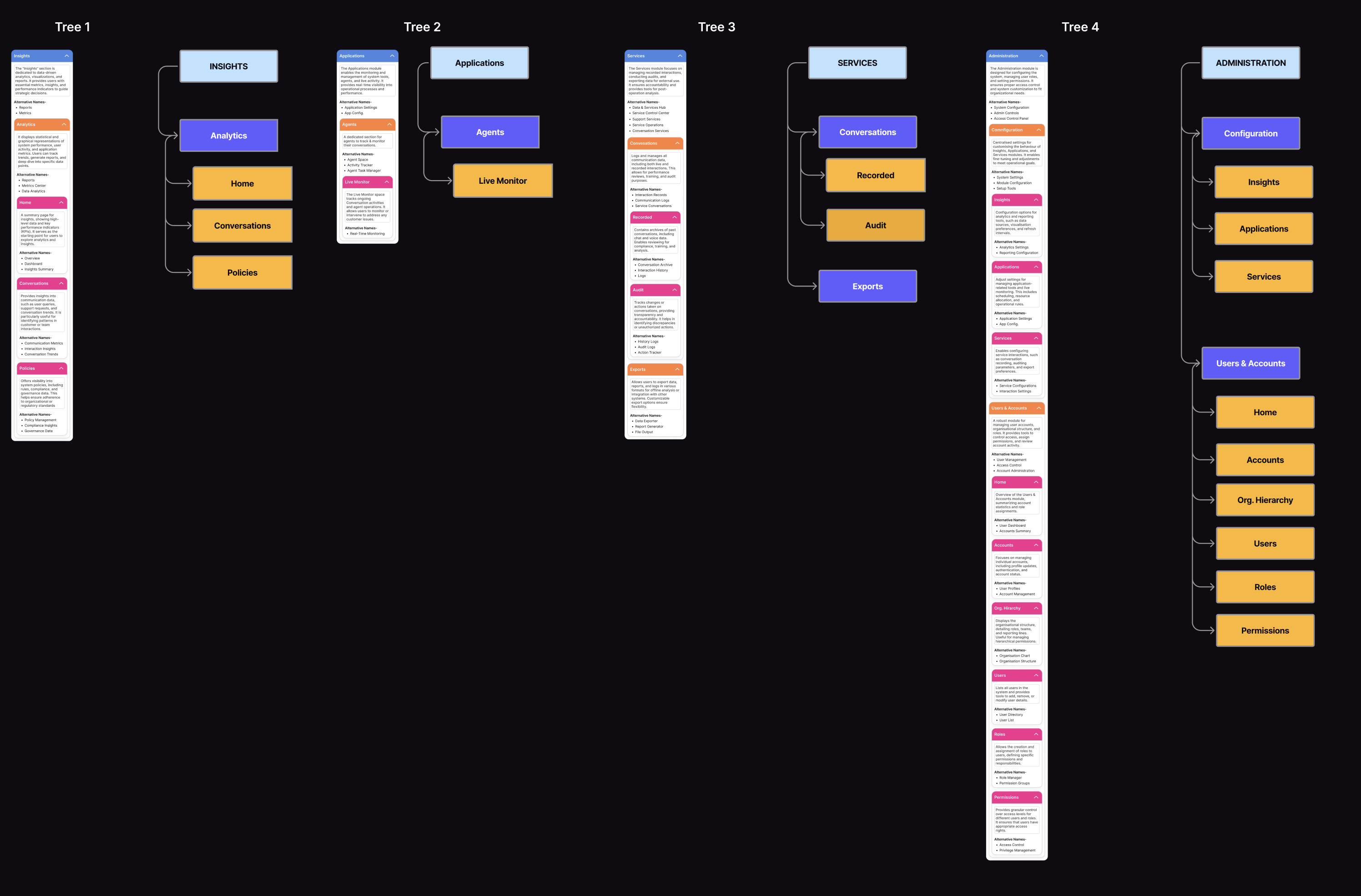
Tree testing results showing four validated navigation structures
Tree testing validated four intuitive navigation pillars — each matching users’ natural mental models for how they think about their work.
Step 04

Strategic Thinking: The Four-Pillar Framework

Based on all research, I developed a framework organizing our product suite around four primary pillars:

Insights: “I want to understand what’s happening” — Analytics, dashboards, reports, measurement tools.
Applications: “I want to use tools to do my job” — Operational products for daily use.
Services: “I want to access platform capabilities” — Knowledge bases, AI models, data management.
Administration: “I want to configure and manage” — Settings, user management, integrations.

Intent-based organization · Scalable framework · Research-validated

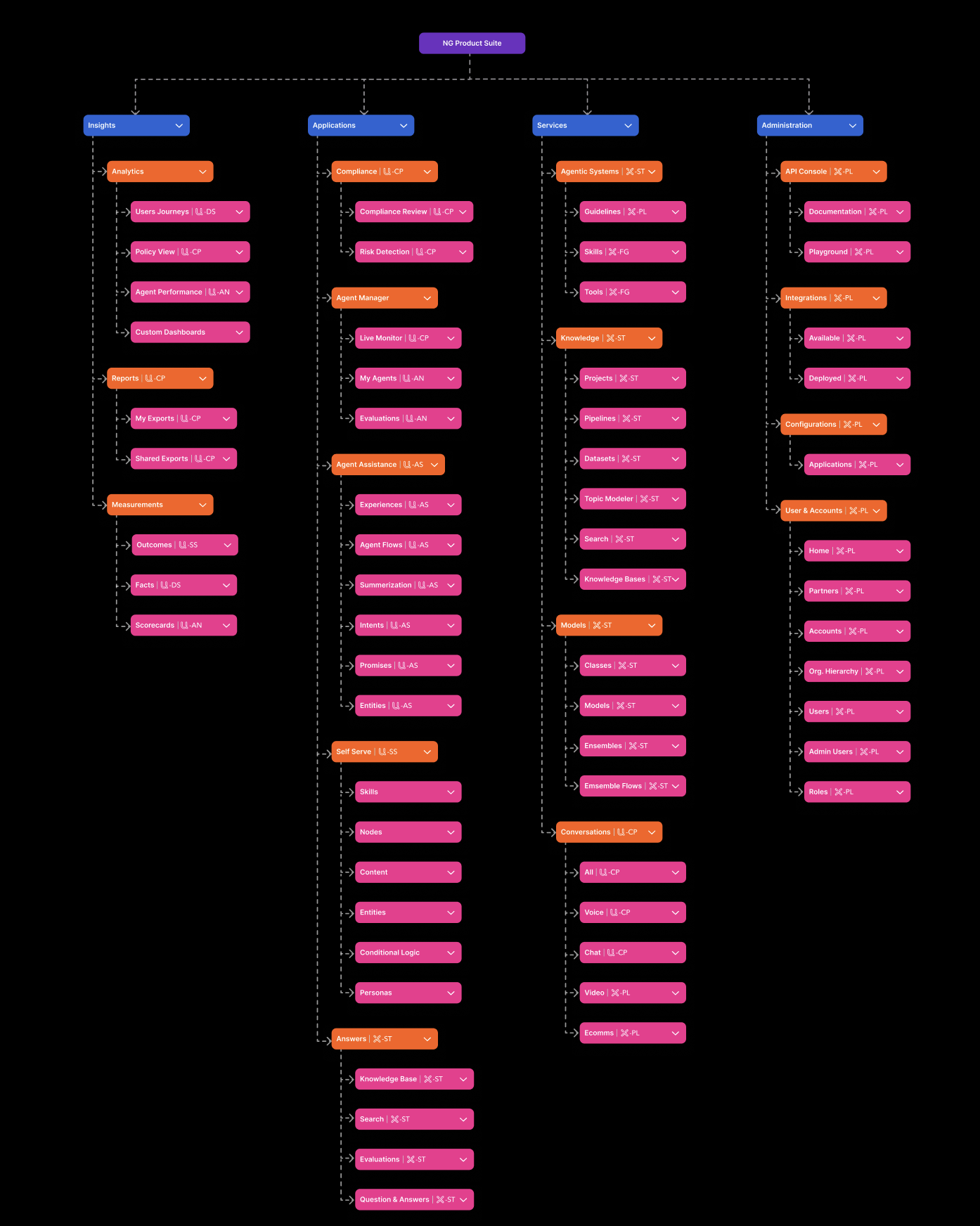
Complete unified information architecture organizing all products into four pillars
The complete unified information architecture — organizing every feature from all 12 products into four intent-driven pillars with a clear three-level hierarchy.
Step 05

Leadership Pitch & Stakeholder Alignment

With a validated framework, I needed to get buy-in from leadership and twelve product teams.

The Pitch Strategy: I led with the business problem (backed by data), demonstrated user pain (research quotes, journey maps), showed competitive pressure (benchmarking), and presented the solution as evolution—not replacement—of existing products.

I created detailed Figma mockups showing how each product would appear in the unified structure. The pitch was successful—leadership approved and product teams shifted from resistance to enthusiasm.

Executive approval secured · 12 product teams aligned · Implementation roadmap defined

Solution

The Unified Architecture

The final architecture wasn’t arbitrary—every decision was grounded in research:

Why four pillars? Users naturally grouped features into 3–5 categories. Four provided enough separation while remaining few enough to be memorable.

Why organize by intent? Users think in tasks, not products. “See how my team is performing” not “open AnalyticsHub.”

Why maintain product identity? Complete dissolution would cause too much disruption. We preserved familiar modules within the new structure.

Why progressive disclosure? 200+ features would overwhelm. A three-level hierarchy—Pillars → Modules → Features—kept the interface clean.

Navigation Philosophy
Predictability: Always know where you are and how to get back.
Efficiency: Common tasks reachable in 2–3 clicks.
Flexibility: Multiple paths—search, recent items, favorites, direct navigation.
§
Handling Complexity
Role-based views: Admins see configuration, operators see tools.
Contextual features: Settings appear where they’re needed.
Graceful scaling: New products slot into existing pillars without restructuring.
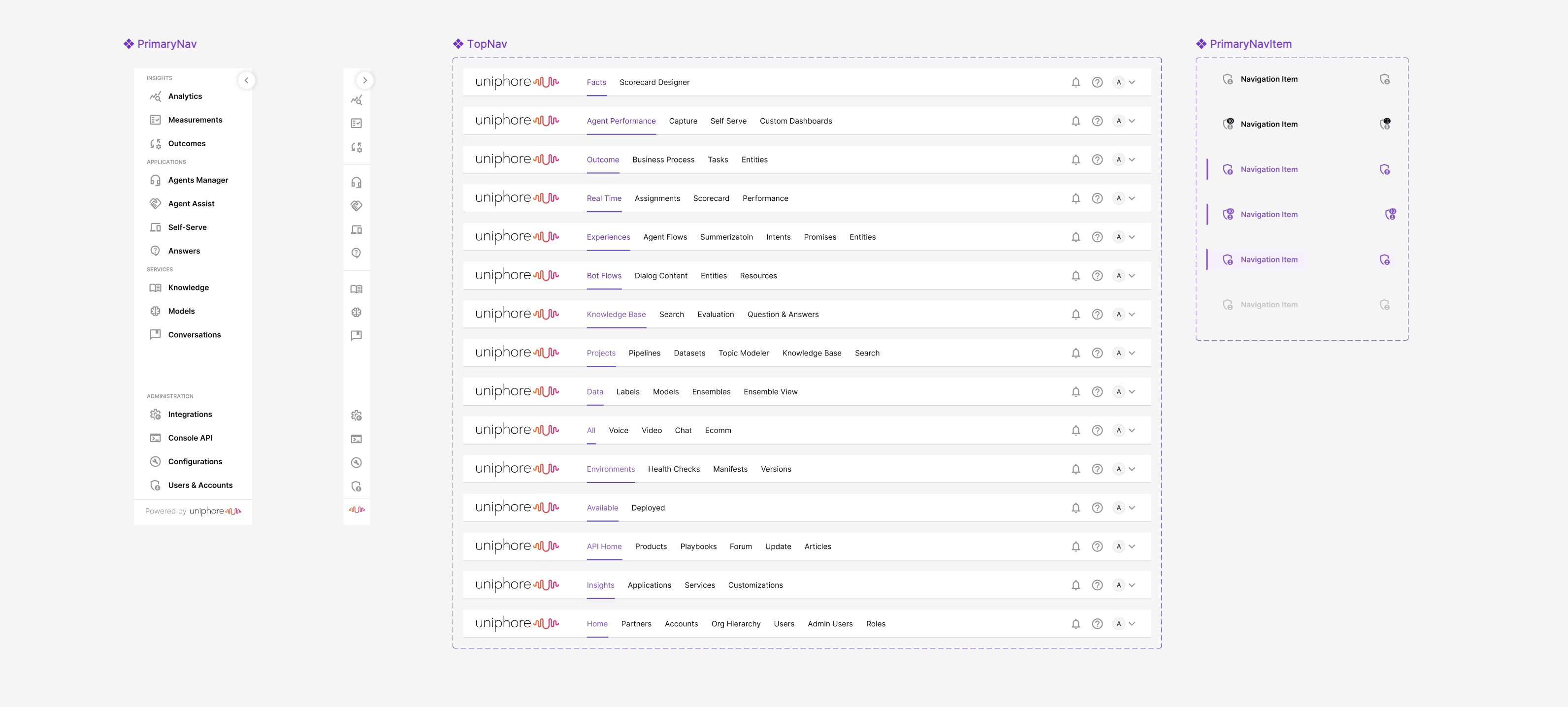
Unified navigation system showing primary sidebar and contextual top navigation
The unified navigation system — a persistent sidebar for pillar-level navigation and contextual top nav for module-level wayfinding across every product area.
The Four Pillars
Insights
“I want to understand what’s happening”
AnalyticsHub: Agent Performance, Custom Dashboards, Scorecards
InsightExplorer: Trend Exploration, Signal Detection, Ad-hoc Queries
Reports: My Exports, Shared Exports, Outcomes
Customer & Sales Suite
“I want to use tools to do my job”
ConvoCapture: Voice, Chat, Video Capture
AgentAssist: Live Guidance, SOPs/Flows, Summarization
BotStudio: Channels, Personality, Bot Testing
ComplianceDesk: Monitoring, Flagging, Compliance Reports
SalesIQ: Pipeline Insights, Deal Intelligence, Coaching
Platform Services
“I want to access platform capabilities”
DataStream: Data Pipelines, RAG Infrastructure, Datasets
ModelForge: Model Catalog, Agent Builder, Prompt Library
AudienceIQ: Audience Segments, CDP, Real-time Activation
CampaignHub: Campaigns, Messaging, Marketing Automation
Administration
“I want to configure and manage”
CoreLayer: App Configuration, Service Settings, Customizations
Users & Accounts: Partners, Accounts, Roles, Provisioning
Integrations: Available, Deployed
API Console: Documentation, Playground
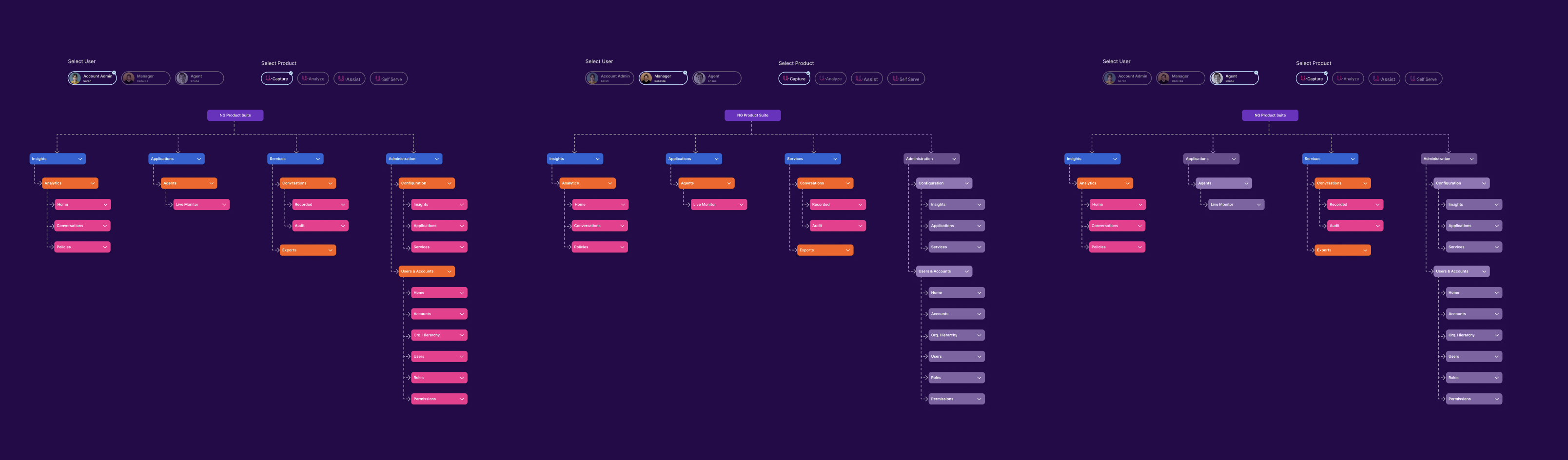
Role-based navigation showing how the platform adapts per user type and product entitlement
Navigation adapted dynamically based on user role and product entitlements — Account Admins, Managers, and Agents each saw only what was relevant to their work.
⤓ Progressive Disclosure
Reveal complexity only when needed
Keeping the interface clean by exposing features progressively through the three-level hierarchy.
□ Consistent Patterns
Unified interactions
Same navigation, terminology, and interaction patterns across every module in the platform.
✓ Role-Based Access
See only what’s relevant
Users see a tailored interface based on their role, reducing cognitive load and improving focus.
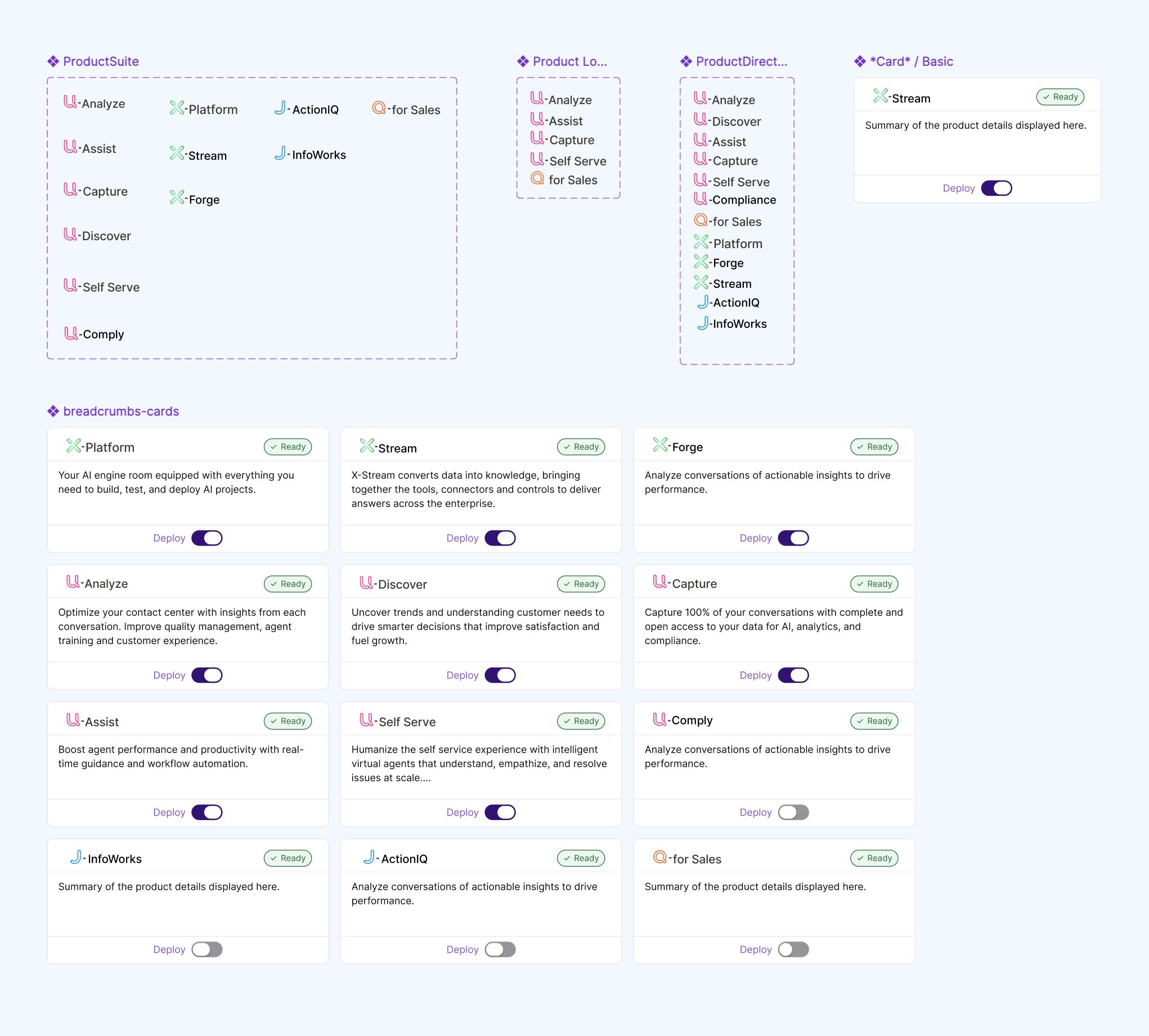
Scalable component library for the unified product suite
A scalable component library — product cards, navigation elements, and breadcrumbs all following unified design patterns across the platform.
Deliverables

The Unified Platform Screens

With the information architecture validated and stakeholders aligned, I designed the final platform screens across all four pillars — translating the research-driven structure into a cohesive, production-ready interface.

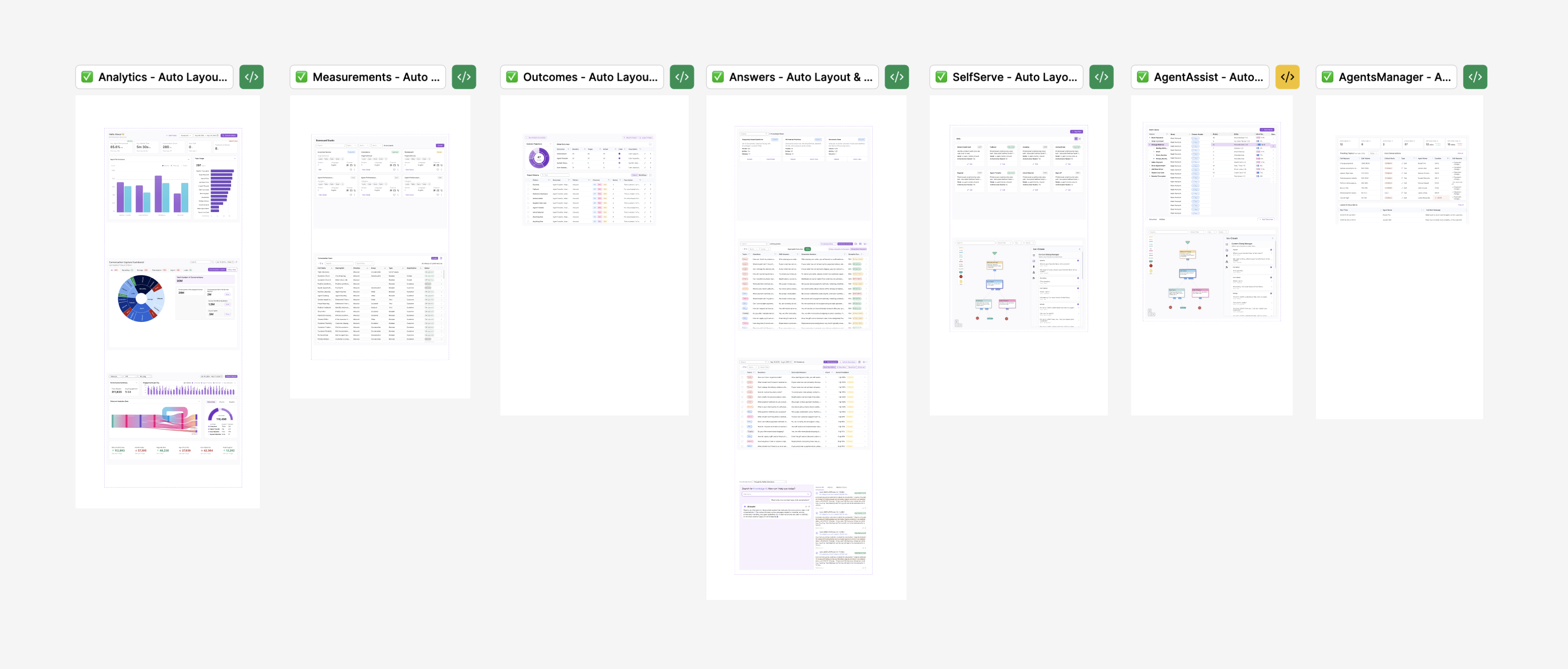
Final platform screens for Insights and Applications pillars
Final screens — Insights & Applications pillars: Analytics, Measurements, Outcomes, Answers, Self Serve, Agent Assist, and Agents Manager.
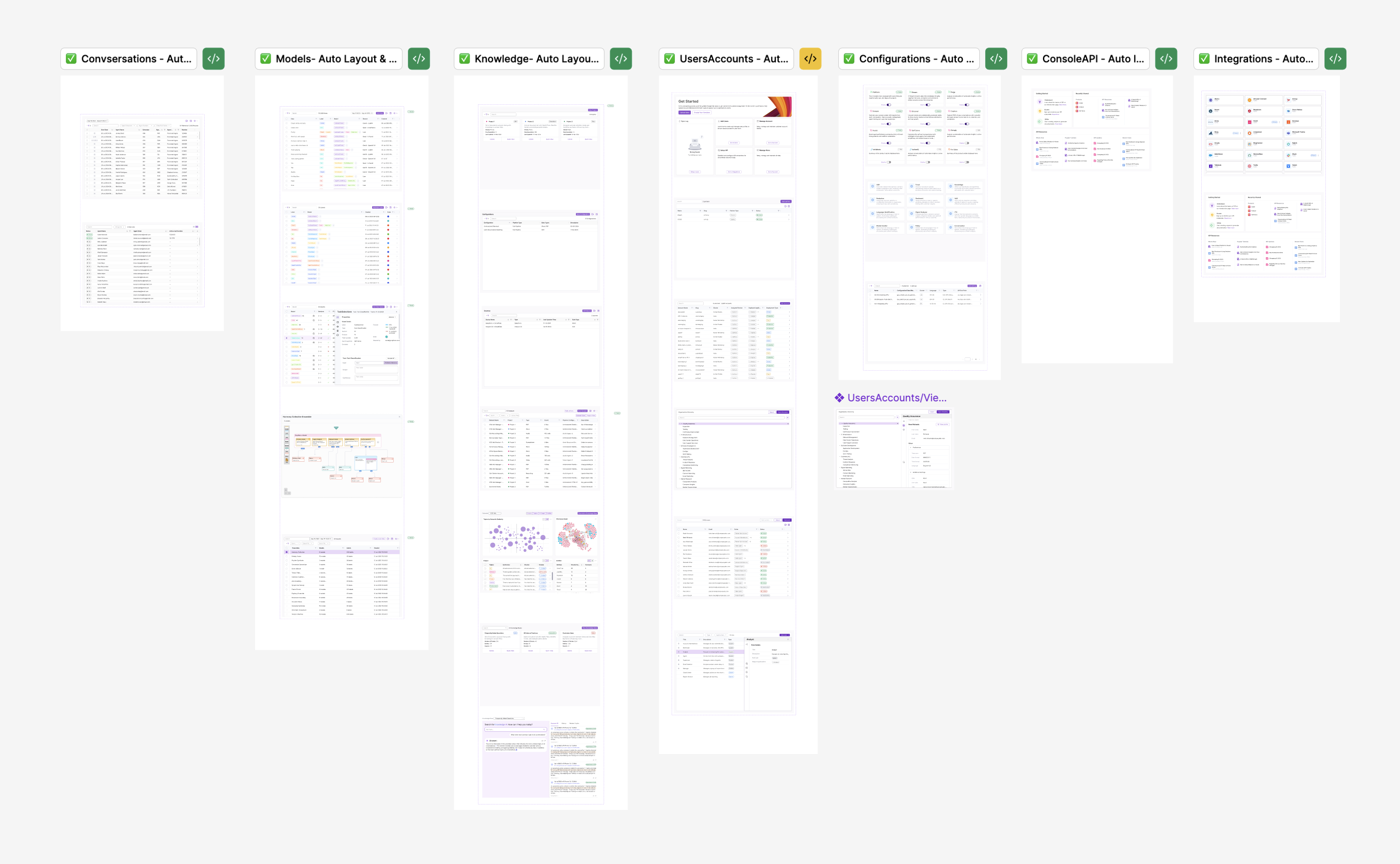
Final platform screens for Services and Administration pillars
Final screens — Services & Administration pillars: Conversations, Models, Knowledge, Users & Accounts, Configurations, Console API, and Integrations.
Impact

Results & Outcomes

1
Unified Login
Single sign-on replacing 4 separate credentials.
85%
Faster Navigation
Time to find features across the platform.
60%
Less Support Tickets
Reduction in confusion-related support tickets.
4
Clear Pillars
Intuitive mental model validated by user research.
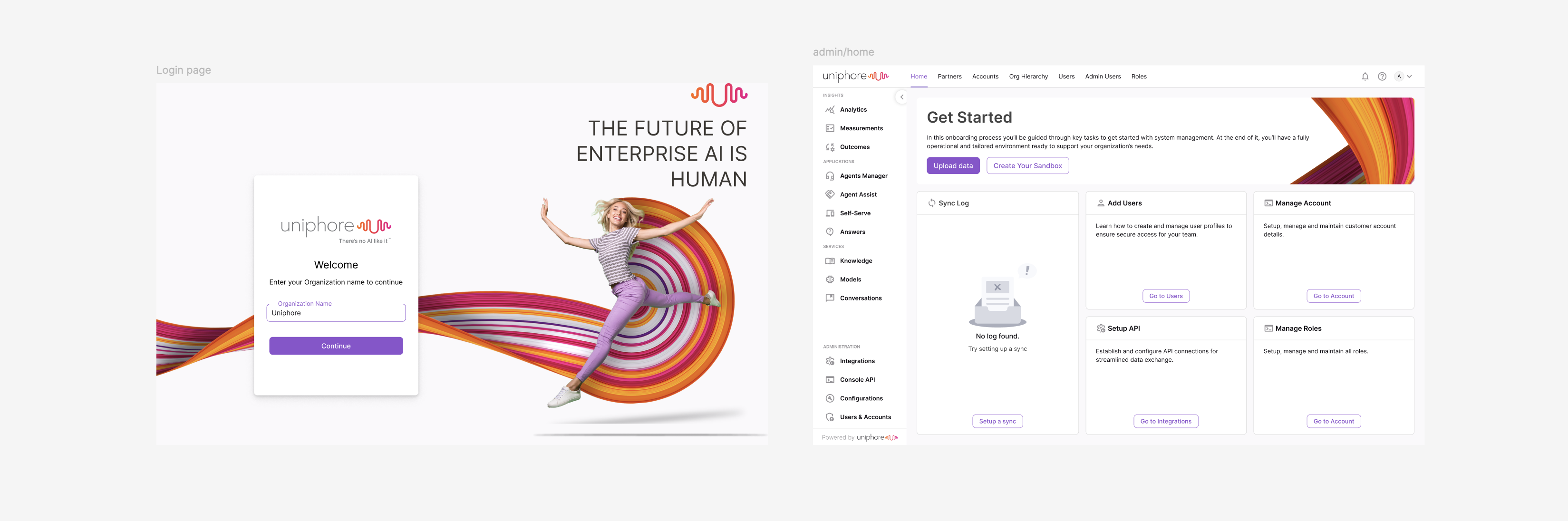
Unified login experience and admin onboarding dashboard
From fragmented logins to a single unified entry point — the new login experience and admin onboarding dashboard.
Before
12
Separate products
4
Different logins
5
Different experiences
40+
Duplicate terms
After — Unified Platform
1
Cohesive platform
1
Single sign-on
4
Intuitive pillars
1
Unified taxonomy
Learnings

Key Takeaways

1
Stakeholder Alignment is Critical
Unifying products means unifying teams. Each product had owners deeply invested in their work. Early buy-in and consistent communication was essential. What worked: I involved product teams from day one as collaborators, not reviewers. Their fingerprints on the solution made them advocates.
2
Terminology Matters More Than Expected
Users had strong attachments to existing terms. “Knowledge Base” meant something different in each product. What worked: We let user research drive terminology decisions. Card sorting revealed which terms resonated most naturally.
3
Research Investment Pays Dividends
The four months of research felt long, but it was invaluable. Every time someone questioned a decision, I could point to specific research findings. The research also helped identify potential pitfalls before we committed to solutions.
4
Executive Communication is a Design Skill
The best solution means nothing if you can’t get it approved. Pitching to executives requires strategic narrative, business impact, and confidence. I focused on business outcomes (retention, support costs) rather than UX best practices.

What I’d Do Differently: Start user research earlier—should have run stakeholder and user interviews in parallel. Create a change management plan—users needed help transitioning mental models. Document trade-offs more explicitly for future team members inheriting the architecture.

From Fragmentation to Unity

This project demonstrated that the hardest design problems aren’t about pixels—they’re about people, systems, and strategy. By grounding every decision in research and bringing stakeholders along the journey, we turned twelve competing products into one coherent platform.