When I joined the Risk & Compliance team at a global fintech in 2018, investigators were managing fraud detection, money laundering prevention, and regulatory compliance using Excel spreadsheets and juggling 6+ different applications per case. Over 18 months, I led the design and product strategy for three interconnected platforms that transformed how the company handled risk investigations globally.
The company processes millions of transactions daily. Every transaction flows through SINE (Scan Engine), a real-time risk screening system that flags potential money laundering, terrorist financing, sanctions violations, PEP matches, fraud, and policy violations. Flagged transactions become cases routed to one of 10+ specialized departments: PEP, SAR, AML, DD, EDD, CDD, ODD, BRM, Fraud, Underwriting, and Global Investigations.
The situation when I arrived:
The solution emerged as three interconnected platforms: SCM (Simplified Case Management) to unify investigation tools, HCP (Holistic Customer Profile) as a single source of truth for customer data, and CCI (Customer Centric Insights) to reorganize departments into persona-based teams with a modular widget platform.
August 2018. I joined as a Product Manager, though my background was in product design. Leadership specifically wanted someone who could bridge both disciplines. My first challenge: I knew nothing about payments, compliance, or risk operations. I spent my first two weeks just learning acronyms — chargebacks, OFAC, sanctions lists, false positive detection rates, KYC vs. CDD vs. EDD.
I could have faked expertise. Instead, I embraced being a beginner. I asked “stupid questions.” I took notes obsessively. I built a glossary. This beginner’s mindset became my superpower — I wasn’t constrained by “this is how we’ve always done it.”
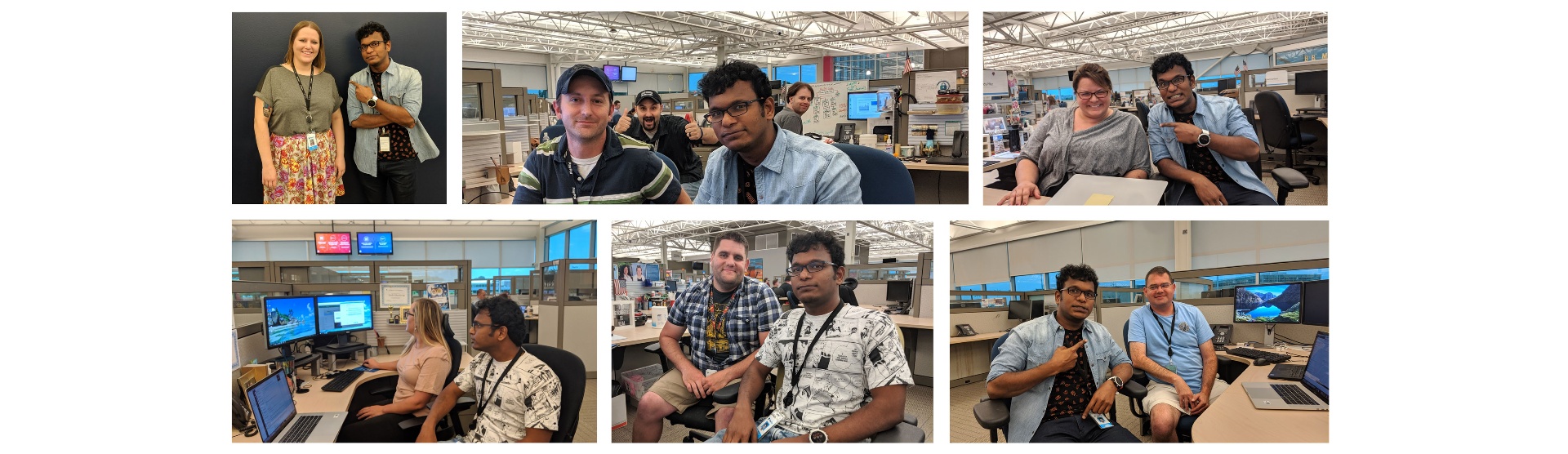
Research methodology. I conducted extensive ethnographic research over 3 months: 30-40 investigator interviews across departments and seniority levels, multiple office locations, supervisor interviews, and full-shift shadowing sessions. Methods included contextual inquiry, task analysis, journey mapping, pain point identification, and cognitive load assessment — documented in Miro, Google Sheets, and screen recordings.
I created detailed journey maps for each department covering six phases (Case Assignment, Information Gathering, Analysis, Documentation, Approval/Escalation, Case Closure) — mapping actions, tools, time spent, pain points, emotional state, and failure points for each.
Key Research Findings
The Excel Nightmare. Every department managed cases in Excel spreadsheets passed around via email — not a shared database, not a ticketing system. A typical workflow: receive case email, open personal Excel tracker, log into Attack (copy transaction details), log into Admin (copy personal data), open Norkom (search risk flags), open World-Check (check against lists), manually compare, document in Excel, email supervisor, wait for response. For. Every. Single. Case.
Tool Fragmentation. Minimum 6 applications per case (Email, Excel, Attack, Admin, Norkom, World-Check) — some departments added LexisNexis, Dow Jones, and Google Maps for manual address verification. Each required separate login and different UI patterns. Average: ~50 clicks per case.
The Aha Moment. A senior investigator told me: “We are one company, but we use sooooo many tools for investigation.” World-class engineering, billions in payments — yet investigators were copying data manually between 6 systems, spending more time on tooling than actual investigation.
Departmental Silos. No shared case visibility (PEP couldn’t see SAR’s flags). No communication protocols. Same user under review by 3 departments simultaneously without anyone knowing. Duplicated effort, inconsistent decisions, frustrated investigators — and the real victims were customers.
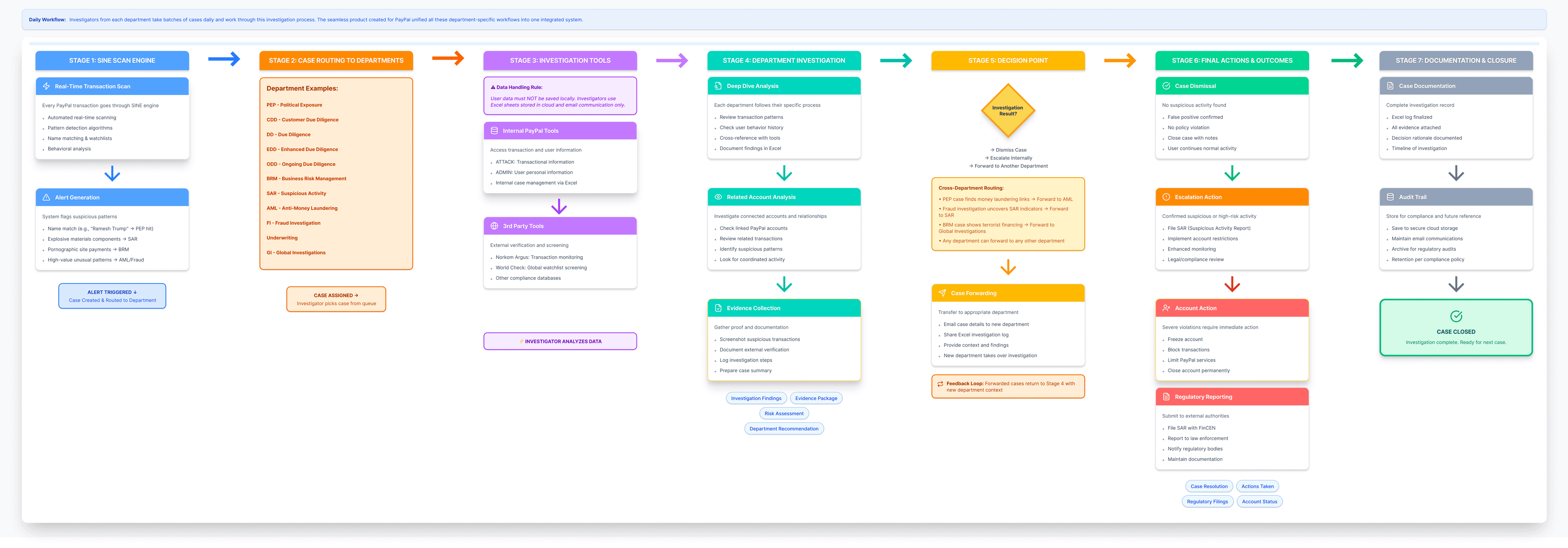
Leadership’s original vision was ambitious: build a case management platform so good that the company could offer it as a product to other companies. For that to work, we needed world-class UX, scalability, configurability, and intelligence. My strategy: start with one department (SAR) to prove the concept, earn trust through execution, expand iteratively, build modular reusable components, and think platform — not point solutions.
Design Principles
| Reduce Cognitive Load | Single-page case views. Progressive disclosure. Visual hierarchy guiding attention. |
| Eliminate Redundancy | Don’t make users find data that exists elsewhere. Automate what machines can do. Pre-fill with known info. |
| Contextual Intelligence | Surface relevant data by case type. Highlight anomalies. Decision support, not just information display. |
| Seamless Workflows | Approvals and escalations built in. No email back-and-forth. Clear next actions at every step. |
| Audit & Compliance | Every action logged. Full audit trail for regulators. Documentation templates for consistency. |
| Human-Centered | Designed for 8-hour shifts. Keyboard shortcuts. Customizable dashboards. WCAG compliant. |
Making UX Part of PDLC
One of my biggest battles. The traditional flow was: PM gathers requirements, engineering builds, designer comes in at the end to “make it pretty.” I pushed for a new model — Discovery (PM + Designer together), Definition (requirements WITH design input), Design (solutions validated with business), Validation (user testing BEFORE engineering builds), Development (designer stays involved), Launch (measure, learn, iterate).
Resistance was fierce. I won by leading with results — prototypes that demonstrated ROI, data that proved design impact, and a collaborative approach that made PMs and engineers co-owners. By the time we shipped PEP, UX was embedded in PDLC. Design reviews at every sprint. User testing non-negotiable. This cultural shift was as important as the products themselves.
We chose SAR as the pilot because it had the most complex workflow (if we could crack this, we could crack anything), high volume (hundreds of cases daily), critical compliance function (reports go to federal regulators), and engaged stakeholders.
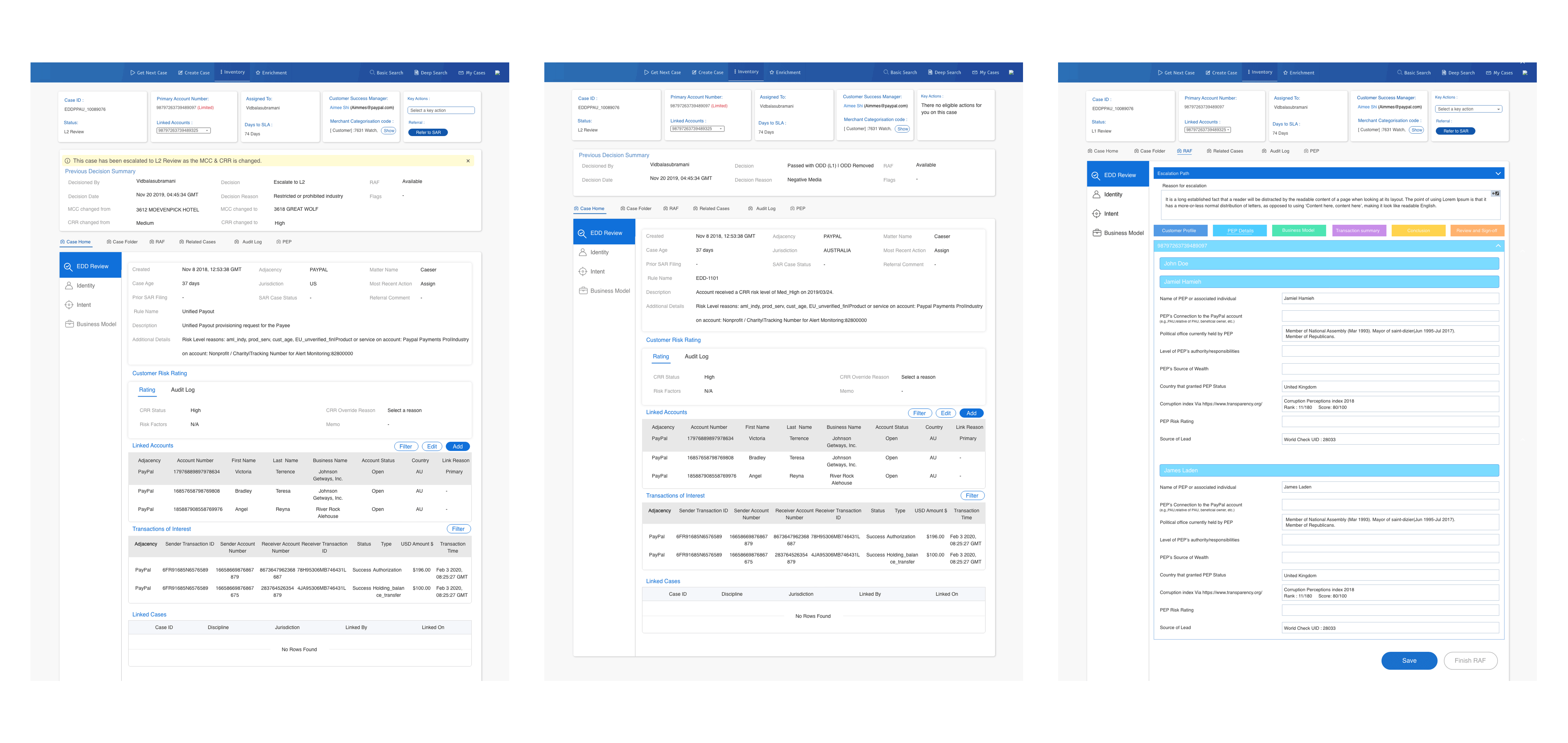
I mapped every data point investigators needed and organized them into a hierarchical widget structure: a Primary Panel (always visible) with case header, transaction summary, and quick actions; and Secondary Panels (collapsible) for user profile, transaction details, risk indicators, related cases, external intelligence, investigation notes, evidence, and audit trail. Low-fi wireframes in Sketch, then moderated usability testing with 5 SAR investigators revealed key needs: keyboard shortcuts, color-coded priority, inline notes, drag-and-drop evidence attachment.
Key features shipped: single-page case view (no more tabbing between 6 apps), contextual collapsible widgets with drag-and-drop reorder, embedded Norkom/World-Check intelligence (auto-pulled on case open), inline rich-text notes with auto-save, smart actions (pre-filled dismiss templates, auto-populated info requests, one-click escalation), full audit trail, and dashboard with personal/team queues and filters. Built with React, Redux, RESTful APIs, SSO, encrypted data with no local storage.
Phase 2: PEP & The Google Maps Innovation
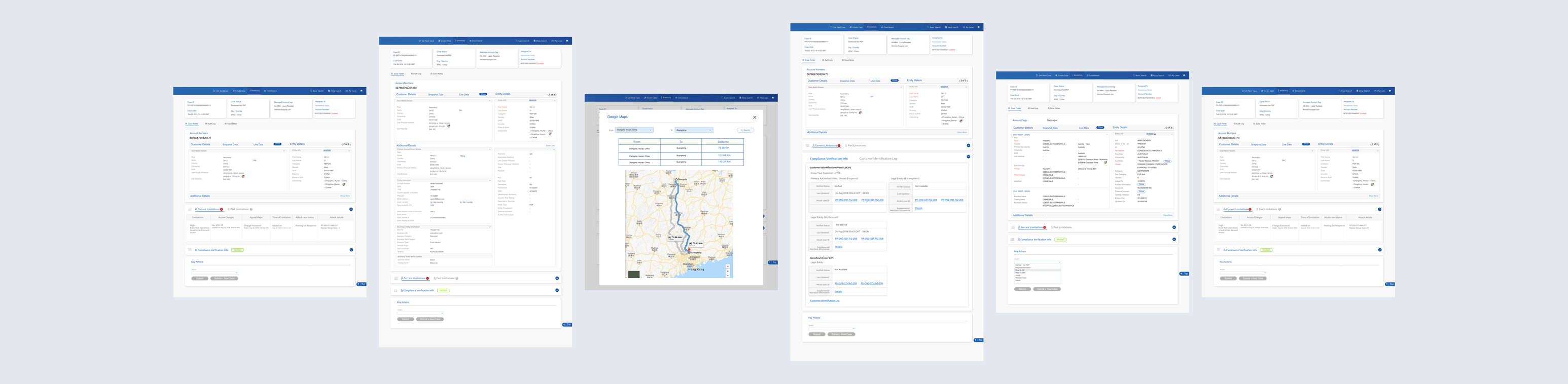
During shadowing, I noticed a tedious pattern: investigators would open a PEP case, pull the user’s address from Admin, pull the PEP hit address from World-Check, open Google Maps in a new tab, paste both, check the distance. If >500km, it’s a different person — case dismissed. This happened hundreds of times per day.
I proposed automating this with Google Maps API. Engineering pushed back (“nice-to-have,” “API costs money”). Instead of arguing, I built proof: a clickable InVision prototype with real anonymized data and functional Maps integration. A/B test with 20 PEP investigators, 50 cases each, 2 weeks. Results: 67% AHT reduction for distance-based dismissals, 22% of cases auto-dismissed, test group closed 40% more cases per day.
ROI: Investment: ~$15,000 (eng time) + $500/month (API). Return: ~500 cases/day × 3.5 min saved = 29 hours/day = $530,000/year savings. Payback period: 1 month. Approved immediately. Built in 2 weeks.
Phase 3: Scaling to Other Departments
With SAR and PEP proven, we rolled out SCM to DD, EDD, CDD, ODD, and BRM. Instead of building from scratch, I designed modular, reusable components — universal Case Header, configurable User Profile Widget, department-specific Transaction and Risk Indicators widgets, universal Notes and configurable Actions panels. Reused 70% of code across departments.
By end of 2019, SCM was live across 6 departments: applications per workflow dropped from 6+ to 1, clicks per case from ~50 to 10-15, investigator productivity up 2-3x, training time down 40%. SCM was a success. But I noticed something troubling.
Mid-2019. SCM was live. Investigators were happy. Leadership was celebrating. But I noticed in a weekly ops review: CSAT scores for Risk & Compliance interactions were plummeting. Complaint emails spiking. Escalations to support up 40%. Nobody asked me to look into this — my job was internal tools, not customer-facing experience. But if we made investigators more efficient while customers were miserable, what were we actually accomplishing?
I reached out to Marketing, negotiated access to low-CSAT users, sent a survey to 300 who rated us 1-2 stars (42% response rate), and got 85 opt-ins for follow-up interviews. Finding: 35% of complaints were about chat support (not my problem — but would become my next role). 65% were about redundant verification requests.
“It looks like I have to send some ID proof or the other every day.”
“I got three emails in one day asking for the same documents. Don’t you people talk to each other?”
What was happening: a user’s transaction gets flagged for multiple reasons — AML, EDD, and PEP simultaneously. Three separate cases, three investigators, three independent emails requesting overlapping information. From the user’s perspective: disorganized, inefficient, intrusive. We had optimized investigators at the expense of customers. Departments didn’t talk to each other.
I built a presentation for the VP of Risk & Compliance: declining CSAT, root cause analysis, real customer quotes, business impact (attrition risk, 40% more support tickets), and the proposed solution — HCP, a single source of truth with widget architecture. Their reaction: “This is brilliant. Why didn’t we think of this before?” Approved on the spot.
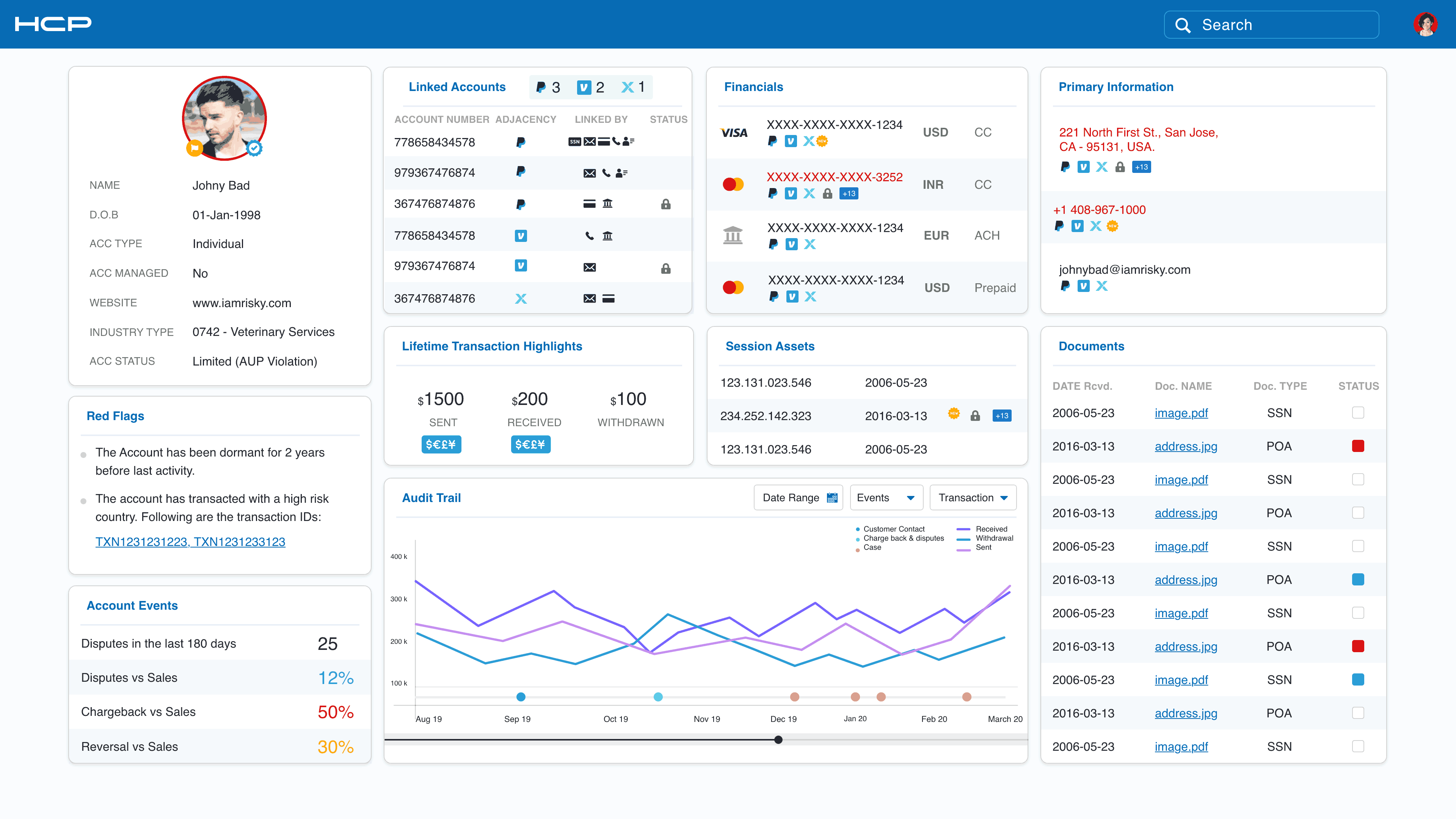
HCP needed to be comprehensive, contextual, accessible across departments with permissions, auditable, and secure. The core concept: a persistent customer profile that investigators could reference during any investigation. Instead of starting from scratch every time, they’d see previous cases, verification status, risk history, and transaction patterns.
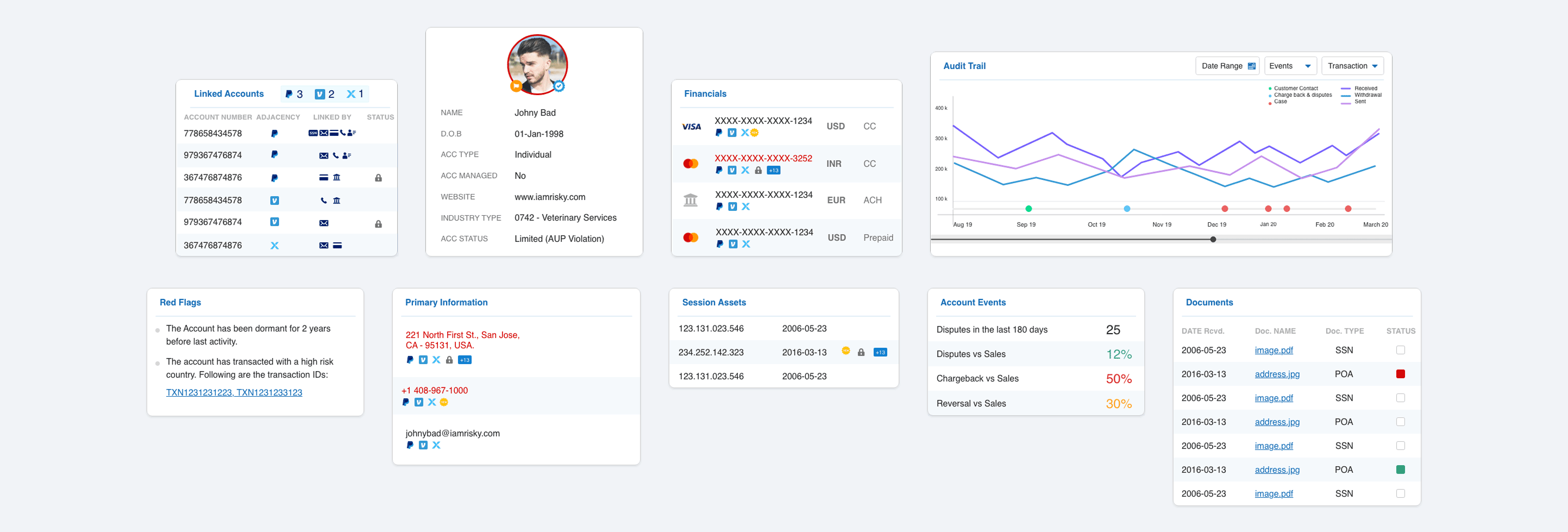
I designed it as a modular widget system with 10 core widgets:
| Profile | Name, email, phone, address, account status |
| Linked Accounts | Family, business, associated emails |
| Financial | Payment methods, balances, limits |
| Primary Info | Core KYC data, verified identity, nationality |
| Lifetime Highlights | Account age, transaction volume, lifetime value |
| Session Assets | Recent logins, IPs, devices used |
| Documents | Uploaded IDs, proofs of address, bank statements with status and permissions |
| Audit Trail | Every action — who, what, when — filterable and exportable |
| Account Events | Creation, limits applied, restrictions, password resets |
| Red Flags | Active risk indicators, fraud alerts, sanctions matches, color-coded severity |
Three iterations to get it right. V1 (full-page dashboard) was overwhelming — “too much info for every case.” V2 (tabbed interface) forced clicking through tabs to find things. V3 (collapsible widgets) nailed it: core widgets expanded by default, secondary collapsed but visible, user-customizable saved layouts. Built on React with GraphQL for efficient widget-level data fetching, Redis caching, lazy-loading, and role-based access control.
“HCP changed everything. I can see a user’s full history before I even start investigating.” — Investigator
“You identified a problem we didn’t know existed and solved it.” — Leadership
Featured in internal company blog. Invited to quarterly leadership summit. $1,000 spot award.
Late 2019. HCP was live. But a PM and I kept having the same conversation: departments still worked in silos. A PEP investigator could see the customer profile, but not SAR’s investigation notes. What if we went further?
The hypothesis: instead of 10+ departments with unique tools, workflows, and training — organize around 3 core personas. One modular platform that adapts to each. Investigators work across personas. Shared intelligence. Massive OPEX reduction. Build tools for job functions, not departments.
The Global Research Tour
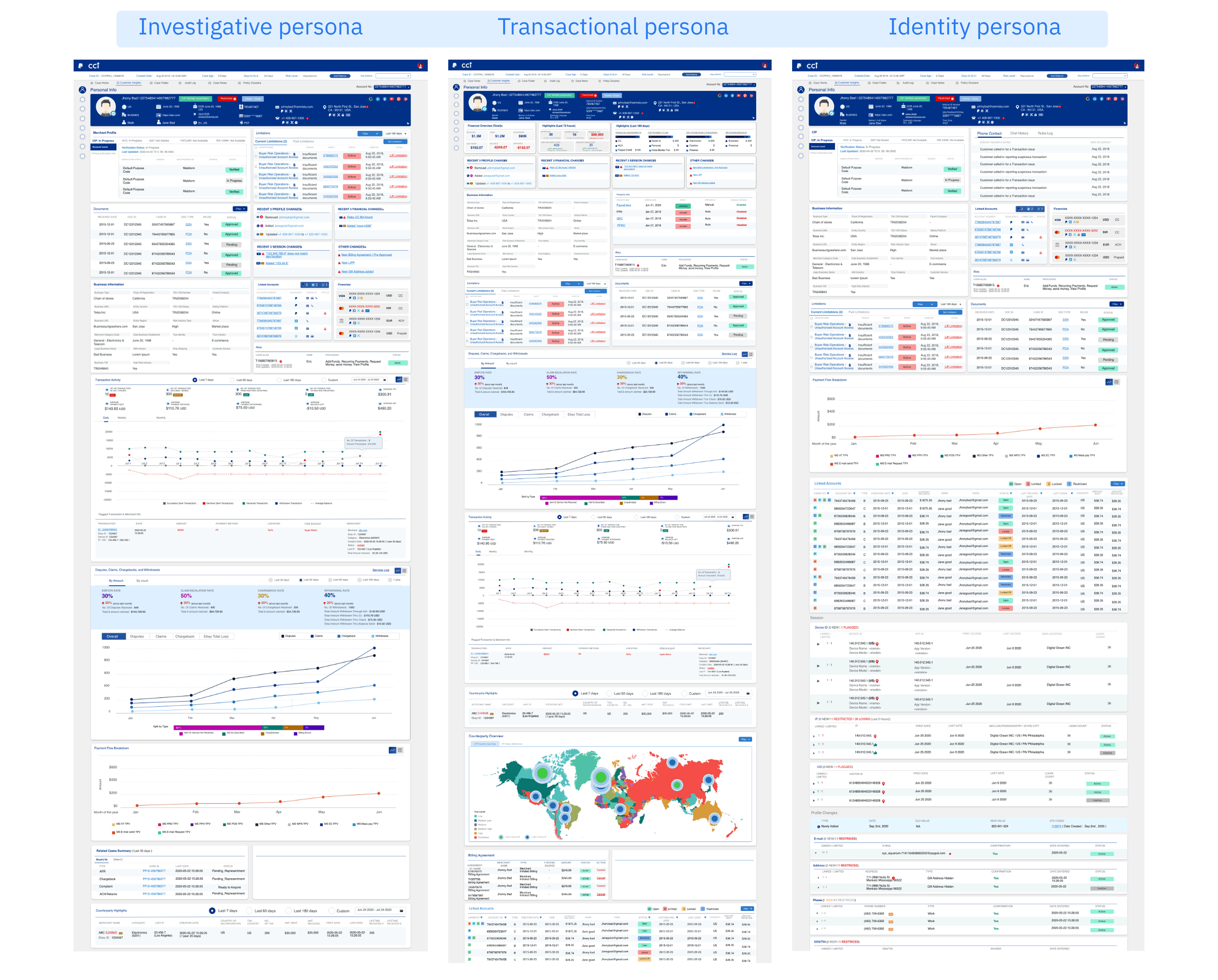
August 2019. I traveled to 5 offices in 11 days (San Jose, Austin, Phoenix, Omaha, Chicago). 60+ interviews, group workshops with card sorting and workflow mapping, shadowing sessions, and supervisor interviews. Despite 10+ department names, the underlying job functions fell into three clear categories:
The insight: all three personas needed the same underlying customer data (HCP), viewed through different lenses. Same data, different priorities. Instead of 10 separate tools, one modular platform with configurable widgets per persona.
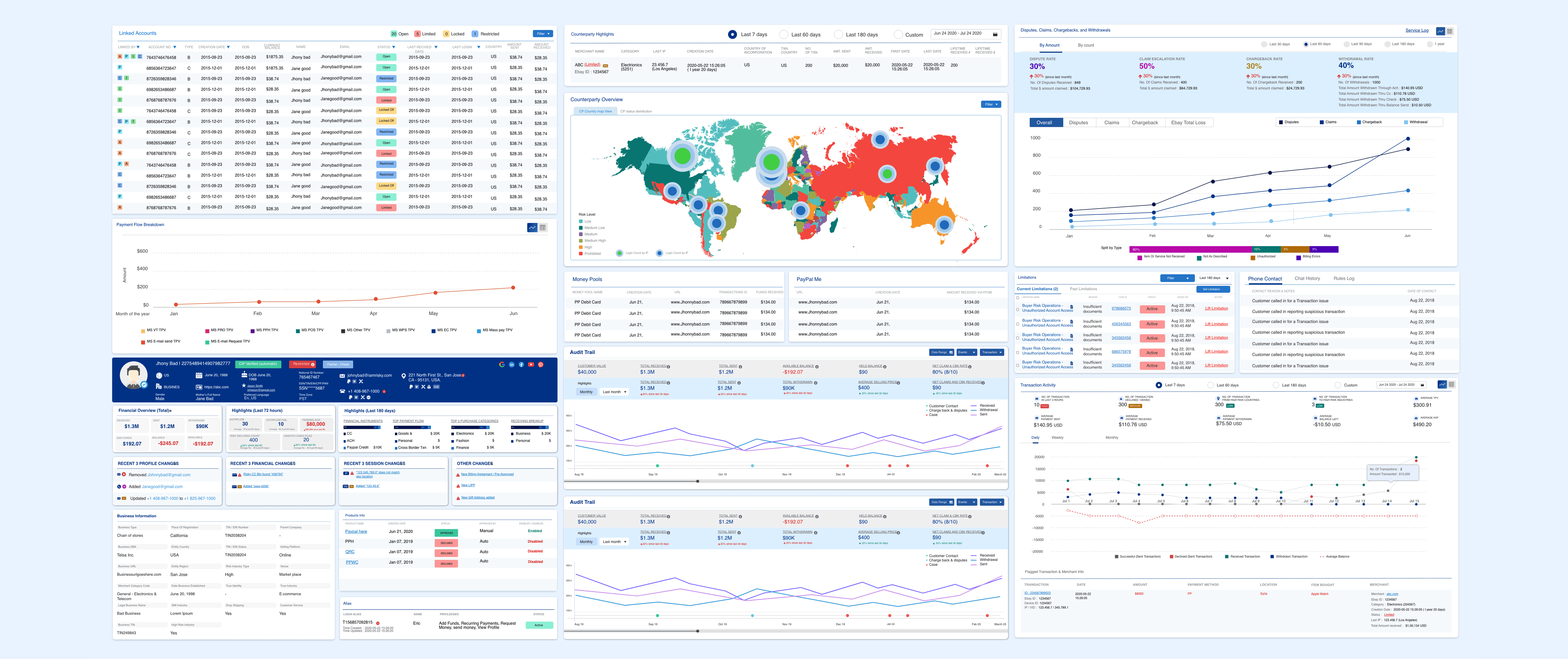
HCP’s 10 widgets expanded to 21 for CCI (adding Merchant Profile, Limitations, Business Info, CIP, Device, Transaction Activity, Alias, Disputes/Claims/Chargebacks/Withdrawals, Payment Flow Breakdown, Related Case Summary, Counterparty Highlights). Each persona got a pre-configured template with default, secondary, and hidden widgets. 12-column grid layout with drag-and-drop, resize handles, persistent saved layouts. Adding a new persona = new widget configuration, no engineering required.
Design System: Built for Finance
I created a purpose-built design system tailored specifically for the financial compliance landscape. Blue was chosen as the primary color intentionally — in finance, blue signals trust, reliability, and authority. Investigators spend 8-hour shifts making high-stakes decisions on fraud and money laundering cases; the interface needed to feel dependable, not flashy. Spacing was kept deliberately tight throughout the system because these screens are data-dense by nature — investigators need to see transaction histories, risk flags, customer profiles, and case notes simultaneously without excessive scrolling. Every pixel of whitespace was a tradeoff against information density. The result was a design system of 35+ reusable React components, 21 investigation widgets, and 12 layout templates that balanced visual clarity with the sheer volume of data investigators needed at their fingertips — all while maintaining WCAG 2.1 AA accessibility standards.
Rollout
Phase 1 pilot (Oct-Nov 2019): 30 investigators, 10 per persona. Phase 2 (Dec 2019): full SAR, PEP, AML, Fraud (300 investigators). Phase 3 global (Jan-Feb 2020): all departments, coordinated with EMEA, APAC, LATAM, translated into 5 languages. By February 2020: 1,200+ investigators using CCI daily.
“This is more than a product. You’ve fundamentally rethought how we approach risk investigations. This will be the model for years to come.” — Leadership
Reflection
When I joined the company in August 2018, I was new to payments, new to compliance, a designer proving myself in a PM role. By early 2020, I’d shipped 3 major platforms, reduced investigation time by up to 78%, improved customer satisfaction by 44%, consolidated 10+ departments into 3 personas, and transformed an entire organizational workflow.
Great design isn’t about interfaces. It’s about understanding systems, empathizing with humans, and having the courage to challenge the status quo. SCM, HCP, and CCI didn’t just make processes faster — they made investigators’ lives better, made customers happier, transformed organizational structure, and proved that design drives business transformation.